Skip Navigation

News & Past Hot Tips

Jul

31

2024

Updated SCWMLS Profile Sheets

Updated listing profile sheets which reflect upcoming database changes can be found here.

Jul

24

2024

How to Communicate Seller Concessions in the MLS

Communicating seller concessions within the MLS is allowed and remains a valuable marketing tool following the NAR settlement changes that will be implemented on August 16th.  Here are the directives to follow to maximize transparency and correctly communicate seller concessions within the MLS:

  • Concessions vs. Compensation: Concessions are not a replacement for communicating offers of compensation or commission. Concessions cannot be included in the MLS if they are limited to or conditioned on payment to a cooperating/buyer broker. Concessions are a separate line item under the Marketing section of the listing contract. Anything identified under the Commission or Compensation to Others sections is not a concession, and may not be referenced in the MLS.
  • MLS Remarks Fields: Concessions can be offered in the public or private MLS remarks fields. We recommend including any concessions within the public MLS remarks to maximize visibility and transparency.
  • Provide Clarity & ConcisenessSpecify what the concession is for (i.e. roof repair, carpet allowance, buyer closing costs, etc.).
  • Use Dollar Amounts: When entering a concession amount, it must be a dollar amount. Percentages are not allowed in the MLS.

As SCWMLS is responsible for ensuring compliance with the NAR settlement, we reserve the right to add further direction on concessions, including “zero-tolerance” policy adjustments for misuse or creative interpretations. Anyone, including individual agents, can be sued if the settlement requirements are not followed. Remember: We are all in this together! 😊

Visit the NAR Settlement News & Updates page for Q&As on concessions and more.

Jul

24

2024

Introducing Market Snapshot Infographics & Other Market Statistics Resources

We’re excited to introduce two new Market Snapshot Infographic resources that provide concise, at-a-glance market insights to help members maintain a competitive edge and offer up-to-date advice to clients.

These new resources can be found at our MLS Listing Statistics Page.

Additionally, we invite you to leverage all our market statistics resources to get the market data you need, how and when you need it.

  • Our monthly statistical reports provide a comprehensive market overview and year-over-year market performance.
  • The SCWMLS DataPortal via Greenlight is a dynamic platform that gives you access to real-time data and tools that make it easy to grab the data you need to support your transaction and communicate it in a simple, visual way for your client.

Quick links to market statistics resources can be found on the SCWMLS homepage in the box labeled Other SCWMLS Products.

Jul

17

2024

Price Comparison Tool

Within Paragon, there is an easy way to see the number of potential buyers (Paragon contacts with saved searches) at the current list price, and if the price were changed.  This functionality is available for partial listings and subject properties, as well as live listings.  When maintaining a listing click the Price Analysis button at the top:

Check out this short video demonstrating this cool feature:

Jul

11

2024

Autonotification in 3 easy steps

To set up a buyer with auto notifications about new properties you need two things: a contact, and a saved search. The quickest way to set this up:

1. ​​ Create a contact – Click the Contacts icon and choose Create Contact. Enter a first name, last name, and email address, then click the Save button at the top left.

2.  Build the search – On the left panel click Buyer Activity, then click the green plus sign Add Search. Then to the right, click the green plus sign Add New Saved Search.

Put in your criteria and then Save. It will suggest a search name for you which you can change if you like. Click Save.

3.  Send the Welcome Message – Click the blue Send Welcome Message button to send them the link to access their Collab center site.

​That’s it! The search is now running and will send them new matches and price changes.

Jul

9

2024

How to Receive Credit for Imported Sales

If you were on the buyer side of a listing that was imported from another MLS, and you weren’t credited with the sale, MLS staff can help! Simply forward the closing statement & page of the offer that shows you drafted it to listings@wisre.com. We can credit you with the sale so it counts toward your statistics & displays in your sold inventory within the SCWMLS.

Jul

3

2024

New NAR Settlement News & Updates Page

Our new NAR Settlement News & Updates page is a “one-stop” resource where members can stay informed about the latest updates and essential details regarding the recent NAR settlement. Bookmark the link & check back often for important MLS practice changes, forms updates, and links to many other helpful resources.

Jul

3

2024

Making Changes to Existing Auto Searches

If you have a search running for a buyer and they want to change some criteria, you need to edit the search that is attached to their contact in Paragon. Let’s say they aren’t getting very many matches so they want to increase the maximum price they are searching for.

Click the Contacts icon, find their contact and click the name. On the next screen click the name of the search you want to edit.

Make the changes to your criteria, then hover over the Save button and choose Save Search, then click the Save button at the top right.

If there are now more matches for their criteria it will not send an auto email. You will need to resend the welcome message to let them know there are more matches to see. To do that, click Buyer Activity on the left panel, then click the search name that appears under it. Then click the Resend Invitation button.

Customize the subject line and/or message body and click Send.

Jun

26

2024

Text Listings from Paragon

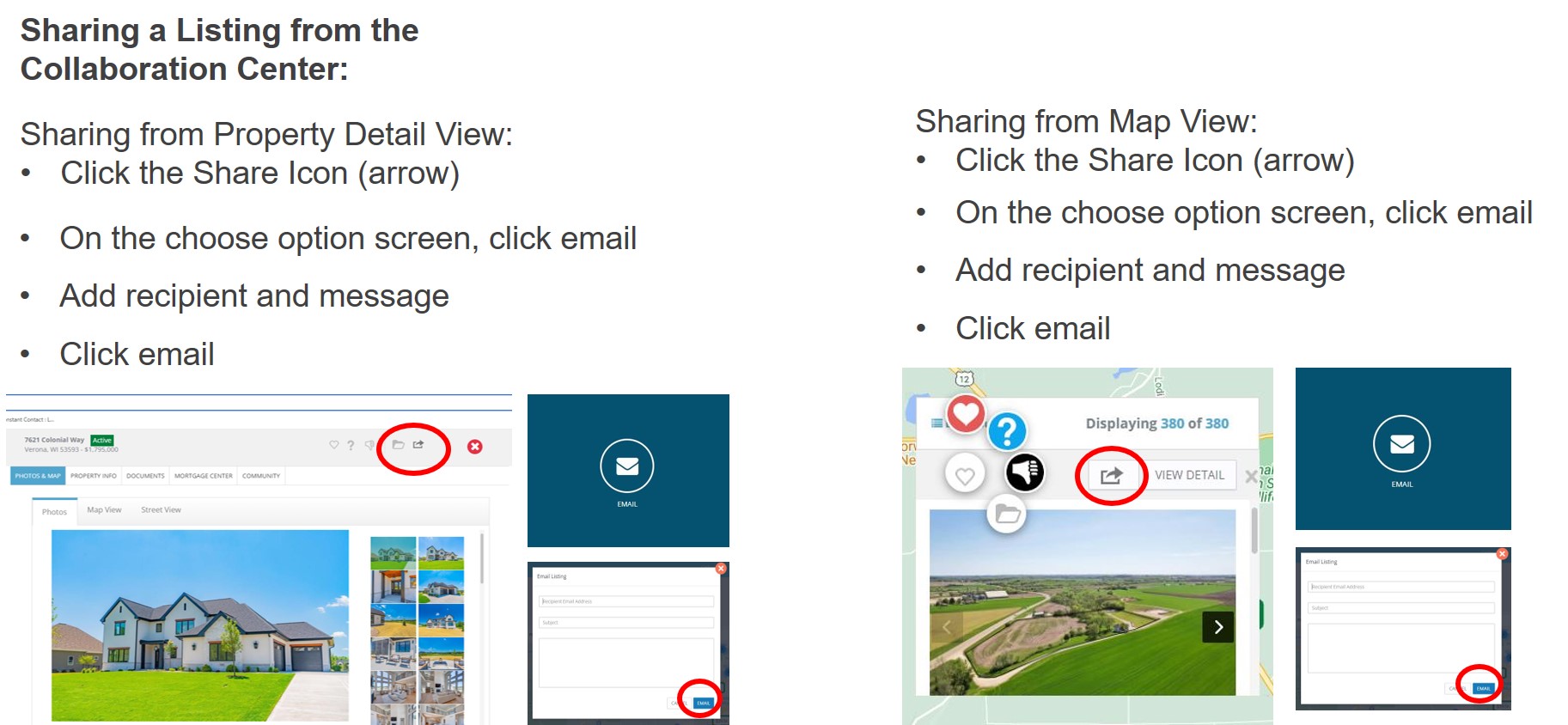
Did you know you can text listings from Paragon? The text option can be found within the Share link when viewing a listing. The Share link is located within the blue menu bar, to the right of the Email button.

Listings can be sent via text to any contact you have saved within Paragon. There is an option to set up a contact on the fly after selecting to text. If you receive an alert stating your mobile number is not configured, simply click on the option given to Configure Settings, and enter your mobile phone number. You need to configure your mobile number just once. You also have the option to add a custom message. Once the text is sent, it will be recorded in the contact’s Message History.

Jun

25

2024

Reminder: Do Not Enter Without a Confirmed Appointment

The security of clients’ properties is a top priority for all of us. If an agent accesses a keybox without a confirmed appointment, even if it is a vacant home, the agent and their broker may be assessed a fine of $500 each. These fines double, and Supra eKEY access may be suspended for a second offense. These penalties are guidelines, and may be more severe depending on the circumstances. A seller can also bring trespass charges against any agent without a confirmed appointment. Before accessing a property, please double check the address, as well as date & time of your showing confirmation to ensure you have permission.

Jun

12

2024

Removing Compensation Offers from Broker Remarks

As part of the NAR settlement agreement, agents and offices will need to remove any references to commission or offers of compensation from the broker remarks of all active, pending and delayed listings. The deadline to do this is Monday, July 1st. You can generate a report in Paragon that displays the broker remarks for all current listings, allowing you to easily identify which listings need to be addressed. Click here for instructions on how to do this. More information on upcoming changes can be found here.

Jun

4

2024

Beware of Listing Scams

The MLS has received several reports of a scam in which an agent is contacted to list a property (often vacant land) by someone posing as the property owner. The scammer will typically handle all communication remotely and request the property be listed for less than its value in order to generate immediate interest. This helpful article from the WRA explains the scam and how to avoid it.​ NAR also has some tips and an informative video on the topic.

If the fraudulent lead came from Realtor.com or Homes.com, please forward the info to listings@wisre.com, as MLS staff can assist in getting the user blocked. Agents may also forward any suspected spam leads from Realtor.com directly to customercare@realtor.com

Another resource is PropertyFraudAlert.com. This free public service is monitored by the county land records offices and will alert a property owner of potential fraudulent recordings that affect their property. Although it does not prevent fraud from happening, it provides an early warning system so the property owner can take the appropriate action if fraudulent activity has occurred. It may be particularly helpful to share this with a property owner who has had someone pose as them and attempt to list their property. Sign up is quick & easy. Go to PropertyFraudAlert.com, select the state & county in which the property is located, and choose how you’d like to be notified.

May

29

2024

Maximizing Exposure for Energy Efficient Listing Features

Did you know the MLS has an associated document for marketing energy efficient features of a home? It’s a great way to highlight things like solar panels, green building certifications, and other energy-saving upgrades & appliances. Check it out here!

There are also several features in the MLS that can be used to draw attention to these improvements (here’s where to find them on the profile sheets). Why should you include this information on your listing? Not only can it attract a larger pool of buyers (and potentially increase property value), it is also useful to appraisers when researching comparable sales.

May

21

2024

Other Marketing Area for Rural/Township Properties

To help maximize exposure for rural properties that are located within a township, you may want to consider adding an Other Marketing Area (which can be found directly below the Location field in Paragon). When including an Other Marketing Area on your listing, please keep in mind that it must be either the mailing city, school district, or a city, village or township that is contiguous to (touching) the township in which the property is located.

The only exception that will allow an Other Marketing Area to be used outside a township is for cities and villages that cross county lines. In these cases, Paragon will automatically include the other county code for that municipality as the Other Marketing Area. Click here for more information.

May

13

2024

SCWMLS Partners with CubiCasa to Provide Free Floor Plans

The SCWMLS is excited to announce a partnership with CubiCasa, an easy-to-use app to create floor plans.

The CubiCasa app is free, and our partnership provides members a 25% discount for add-on products such as adding furniture, including gross living area (very valuable for appraisers), 6-hour rush delivery, plans over 5,000 square feet, and 3D plans.

Click here to access the SCWMLS portal to load the app and capture your 25% discount. When asked for MLS Login ID, please enter your Paragon Login Name.

More detailed information about CubiCasa can be found here.


May

13

2024

Walworth County Listings Now Imported from WIREX

Since June 2017, we have imported over 32,000 listings from other MLSs, via WIREX, directly into your SCWMLS database to make it easier for you to find them. These listings are located in the counties our SCWMLS members typically list and sell in. The MLS numbers for these listings are prefixed by 2 letters to make the MLS number unique, and to identify them as listings that originated in a different MLS system (ex: MM for Metro, NE for Northeast).

As of 5/13/24, we added Walworth County listings to these imports, for a total of 21 counties covered. This means that all current Walworth County listings (plus sold and expired listings with a list date of 1/1/24 and later) can now be found directly within the main SCWMLS database. It is no longer necessary to switch to WIREX to see listings in Walworth County. More information on imported listings can be found here.

May

8

2024

GreenLight Statistics - Two New Reports

Hopefully you know about GreenLight statistics, an interactive statistics program that allows you to customize output by region, county, city, zip, property type, or price range to provide real-time charts and graphs. You can access these stats through Paragon by clicking the Resources icon and choosing GreenLight Statistics. There are now two new reports available to you:

In the MarketReports section, under MONTHLY: Inventory you will now find Months of Supply By Price Range – This will help you see supply and demand within a specific price range.

Under WEEKLY: Inventory you will find New Listings and New Pendings – Useful for monitoring changes in an area each week and comparing it to past years.

Click here to see GreenLight’s monthly report for April.

May

8

2024

"Coming Soon" Signs on Delayed Listings

SCWMLS rules allow “for sale” signs to be placed on listings that are in Delayed status.  Delayed listings are not sent to public-facing websites, which means buyers will not be able to find these properties online.  To provide transparency and inform the public that these listings are not yet available to show, members are encouraged to add a “coming soon” sign rider on all Delayed listings.

For a summary of what can (and can’t) be done with Delayed listings, click here

May

7

2024

Search Hot Tip

Quickly load a previous search you did in Paragon by selecting the Last Search option located above Primary Criteria after selecting Class. Hovering over Last Search will display the 5 previous searches you performed. Clicking on one of these searches will load the search criteria for that past search.

Quickly load the last Quick Search you did by selecting Last Quick Search located under the Quick Search header on the Paragon Home Page. To ensure you are seeing the latest searches, refresh the home page by clicking the Paragon logo or the Home icon.

May

7

2024

Update on Scheduling Showings Between Metro MLS and SCWMLS

On April 8, Metro MLS moved to Aligned Showings and turned off ShowingTime within their MLS system.  Metro agents are no longer able to click a button within their MLS system to schedule showings on SCWMLS listings.  Metro agents can contact you via phone or email to schedule showings manually, or they can access the ShowingTime system at https://www.showingtime.com or via the ShowingTime app and pull up SCWMLS listings by address or MLS number.

Within Paragon & WIREX, you are no longer able to click to schedule a showing on Metro listings (those prefixed by MM).  Our intent is to add a button for the Aligned showings product on Metro listings within Paragon and WIREX, but we are waiting on programming from Aligned.  We unfortunately do not have an ETA as to when this will be done.

Our Board of Directors continues to monitor progress of the Aligned product as a potential replacement for ShowingTime.

back to top