Skip Navigation

News & Past Hot Tips

Mar

1

2023

Realtor Level Access to Edit Listings Expanded:

Agents with standard Realtor level access can now edit all fields of data within their listing(s) with the exception of those fields that are contractual in nature (status, price, Y/N questions, and address). These contractual fields can be modified by someone with a higher security level (ex: office admin or broker).

Feb

21

2023

Reminder to Remove Signs

The MLS has received multiple reports of “for sale” signs not being removed in a timely manner.  Properties may only be advertised while the listing contract is in effect, so please remember to promptly remove all signs when a listing closes, expires, or is withdrawn.   Thank you!

Feb

14

2023

Exclusive Right to Sell vs. Exclusive Agency Listing

The Exclusive Right to Sell listing is the form of listing where the seller provides exclusive authorization to the listing broker to cooperate with other brokers in the sale of their property. By default, all WB listing contracts are Exclusive Right to Sell.

The Exclusive Agency listing also authorizes the listing broker, as exclusive agent, to cooperate with other brokers in the sale of the property, but also reserves to the seller the general right to sell the property on an unlimited or restrictive basis.

An explanation of each of the “Yes/No” fields in Paragon can be found here. Within the Add/Maintain Listing screen, there are also helpful question mark “hint” icons to the right of many of the fields. When clicked, the icon will display an explanation of how to complete that field.


Feb

7

2023

Correct Map Placement

If you have a listing that is not mapped correctly, it may be missed if an agent is searching by map. Please make it part of your routine to always check the map placement when adding a new listing. If the map placement as assigned by Paragon is not correct, you can adjust it under Listing Maintain –> Change GeoCode.

When the map displays under maintain, click on the red map placement marker and move it as needed. Switching to a bird’s eye view (click the down arrow next to the word Road in the upper left corner) and using the zoom feature helps to pinpoint the exact location. There is also an option to enter the latitude and longitude. Before clicking Save, you may want to zoom out a bit as the zoom level will also be saved.

If you are not familiar with the location of a property, the CRS tax program can help you pinpoint it exactly using the latitude and longitude. Click on the red T from the listing to pull the property up within the CRS tax program.  The Latitude/Longitude are the last field within the Location section. Copy and paste into the Change GeoCode option within listing maintain.

As that was a lot of words, here is a helpful video to visually demonstrate:

Feb

1

2023

When to Use Withdrawn by Seller

The status of Withdrawn by Seller should be used when a seller changes their mind about selling, but the listing agent does not release them from their listing contract. Properties in Withdrawn by Seller may not be marketed or shown. Just like with Delayed properties, if the listing agent allows a showing, or a potential co-broke agent shows a property in Withdrawn by Seller status, both agents would be subject to fines by the MLS.

Once a listing is moved to the status of Withdrawn by Seller, the listing firm will not be able to move it back to Active. Before marketing & showings can resume, one of the following must be done:

  1. Execute a new listing contract, expire the previous listing in the MLS, and add a new MLS #. This option will cause the days on market (DOM) count to reset. The cumulative days on market (CDOM) will only reset if the property has been off the market for at least 31 days.
  2. Execute an amendment with the direction to reactivate the listing and submit it to listings@wisre.com. MLS Staff will change the listing back to Active status. This may only be done once per listing. With this option, the days on market will continue to accrue.

If you have a situation where the seller wants to temporarily suspend showings, you should leave the listing as Active, indicate in the first line of the public remarks that there are no showings allowed and provide the date showings will resume. You can change this date if needed.

If the listing agent releases the seller from their listing contract, the status should be changed to Expired.

Jan

26

2023

Entering FSBO Comp Sales

After closing, you have the option to enter FSBO sales for which you represented the buyer.  When entering an unlisted FSBO sale, please:

  • Add the listing in Sold status instead of Active.
  • For list date, use a verifiable date the owner began marketing.  This will create a valid days on market, which in turn will help appraisers. The 4-day input rule does not apply for listings entered as Sold.
  • For expiration date, use the closing date.
  • All required fields, with the exception of room dimensions, are required.
  • Select FSBO Comp – Not Listed under the Sale Factor pick list within the Sold information.  This will automatically change the list side to FSBO Comp.
  • Add at least 1 front exterior photo before saving the listing, as you will not have an option to edit the listing or add a photo after the list side is changed. A primary photo can be added on the left panel of the add listing screen.
  • When entering a comp sale, instead of just entering “sold comp” in the remarks, please include features of the property that are not addressed in our pick lists, especially if there is something unique.

Jan

16

2023

Prior Home Page Hot Tips

All prior hot tips can be accessed by clicking the blue Past Home Page Hot Tips button on the bottom of the Paragon homepage.  The tips are kept by month, and there is a search feature to help you find past tips.

Jan

16

2023

Control your Searches with Search Qualifiers

To the right of most search fields within Paragon, you will find a drop down containing search qualifiers. Most default to Equals or Contains, meaning that when you enter a search option, Paragon will find matches that equal or contain what you have asked for.

You may ask, what is the difference between Equals and Contains? The best way to explain this is with an example: Think of searching by Subdivision. If you type in Seminole, and the search qualifier for the Subdivision field is set to Contains, you will get all the listings with the word Seminole somewhere in the Subdivision field. If you specifically want listings in the Seminole Forest subdivision, you may want to change the default search qualifier to Equals, and type Seminole Forest into the search field to get just listings in the Seminole Forest subdivision.

Besides Equals and Contains, other search qualifiers available are: Not Equal To, Contains All, Does Not Contain, Starts With and Not Starting With.

Jan

10

2023

Warning - Reports of Fraudulent Buyer

We have received 3 reports of a Caucasian male buyer, in his late twenties, providing the first name of Dustin, asking to see high-end homes in Rock County.   He is requesting occupancy before closing, and is providing false proof of funds via a bank in Houston, TX. Please take extra care, and if you suspect you are contacted by this man, please call the Beloit Police Department at 608-364-6800 and reference case BE2253152.

Jan

10

2023

Advertising Before the Effective Date is a Violation of State Law & MLS Rules

Per Wisconsin State Statute 452.136(3), an agent cannot advertise a property unless their firm is the listing firm or has permission from the listing firm. The firm does not become the listing firm until a listing contract has been executed and the term of the contract has begun. This date is also referred to as the effective or list date:

In addition to a state law violation, this is also an MLS rule violation and carries with it a fine of $200 per day.  If any detail of a specific property, sufficient to activate the interest of a potential buyer, is publicly marketed before the effective date of the listing contract for said property, the listing agent shall be fined $200 per day, from the time of advertisement until the effective date of the contract.  This new fine will not exceed $5,000.

Jan

3

2023

Above/Below Grade Square Footage

When calculating above grade square footage, only the finished area on levels that are 100% above grade (ground level) should be included. If an exposed or walk-out lower level has one exterior wall even partially below grade, all rooms on that level must be counted as below grade. More detail can be found within this helpful guide.

Finished Square Footage

According to MLS guidelines, for square footage to be considered finished, the space must be heated, have finished walls (painted concrete does not count), have a finished ceiling (no exposed floor joists), and have a finished floor (painted concrete does not count). If one of these four components is missing, the space can still be considered finished, but disclosure of the missing component must be included in the MLS remarks. Only finished rooms may be included in the room dimensions section. An exception is made for the “Other Room” selections of Three-Season Room, Screened Porch, and Garage, as the name discloses the space as unfinished.

Dec

22

2022

Search Hot Tip

Quickly load a previous search you did in Paragon by selecting the Last Search option located above Primary Criteria after selecting Class. Hovering over Last Search will display the 5 previous searches you performed. Clicking on one of these searches will load the search criteria for that past search.

Quickly load the last Quick Search you did by selecting Last Quick Search located under the Quick Search header on the Paragon Home Page.

Dec

14

2022

Advertising Reminder

 It is against MLS rules to advertise a property listed by another agent/broker without first obtaining permission from that agent/broker. The only exception to this rule is advertising done via an approved IDX site that has been registered with the MLS. IDX sites are only approved if they are controlled by the registered MLS agent/broker, and are clearly identified as such. Sites such as Facebook do not qualify as approved IDX platforms. However, a generic link on Facebook directing viewers to listings on an approved IDX site is allowed. The link itself should contain no information about, or photos of specific listings.  A generic statement such as “Click to see homes in Waunakee” would be allowed.

Dec

14

2022

Dane County Database of Condo/Subdivision Docs

The Dane County Register of Deeds has a searchable database of condo & subdivision documents on their website:

https://rod.countyofdane.com/plat/index

Dec

7

2022

Price Analysis Tool

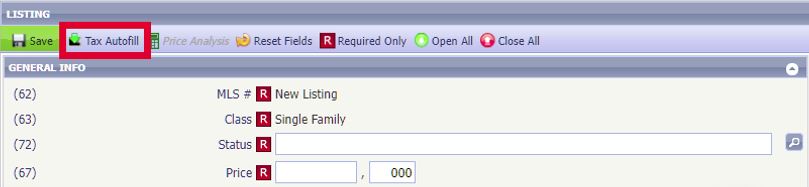
Within Paragon, there is an easy way to see the number of potential buyers (Paragon contacts with saved searches) at the current list price, and if the price were changed.  This functionality is available for partial listings, as well as live listings.   Check out this short video demonstrating this cool feature.

https://vimeo.com/714241325

Nov

30

2022

Share your Listings via Facebook/Twitter

Did you know you can easily share your listings from Paragon to your Facebook page or via Twitter? Find this option within Listings -> Maintain Listings. Click on Select an Action and then Share Listing to Facebook and/or Share to Twitter. The post will include the primary photo, public remarks, and a link to the detail report within Collaboration Center. If you are not currently using Collab Center, you can set up your site under Preferences (in the menu bar at the top of the screen).

Nov

23

2022

Access TrustFunds Activity from Paragon

An option to directly access your TrustFunds portal from Paragon is available under the Resources drop down located on the main Paragon menu. From your TrustFunds portal you can click on Transactions (located in the upper right) to see the status and history for all electronic earnest money transactions for both your buyers and your sellers.  More information on TrustFunds can be found here. 

Nov

15

2022

Keybox Access Hours Change with the End of Daylight Saving Time

Supra keyboxes come from the factory preset to open between the hours of 6:00 a.m. – 9:00 p.m. Central Standard Time, and shift to the hours of 7:00 a.m. – 10:00 p.m. during Daylight Saving Time.  So, with the end of Daylight Saving Time, they now will open between the hours of 6:00 a.m. and 9:00 p.m.

If you would like to change the access hours, or remove all time restrictions, you can do this for keyboxes you have added to your inventory.  Once added, select the keybox and then select Program Keybox.  Change the start or end time by clicking or tapping on the time.  When done, you will need to select to Program the keybox.  You will need to be near the keybox and have the shackle code to do this.

Nov

9

2022

Regarding the Property Condition Report

When working with a buyer, it is very handy to be able to pull a completed Property Condition Report (RECR) from the documents attached to a listing within Paragon.    Not so handy when you find a big X through the report, or a bunch of blank boxes.

The WRA has done a great job educating on seller and agent obligations regarding the Property Condition Report.  In addition, they have prepared the WRA-SRR, for use when a seller refuses to complete, or is not required to complete the RECR.   Please see links below:

WRA-SRR – Seller Refusal/Statement Regarding Condition or Disclosure Report (PDF)

Info on Seller’s Duty to Disclose, As-Is Clause, and Seller Refusal

Oct

27

2022

Why are some "no showings until" listings Active instead of Delayed?

We generally see two reasons a new listing is not available for showings right away. The first is the property is not ready to be marketed via the MLS due to needed clean up, timing for professional photos, desired staging, etc. You will find these listings in the Delayed status as the listing agent does not want them to be visible to the public yet.

In the second situation, the property is all ready for public marketing, but the seller and listing agent decide to pick a launch date, often starting with an open house. You will find these listings in Active, as the seller and agent want them to be visible to the public. The listings in Active must include the date showings will be allowed in the first line of the public remarks.

Our rules regarding “no showings until’ listings have taken both situations into account and allow agents the flexibility to market these listings as either Delayed or Active.

back to top