Aug
2
2023
Paragon Connect
Paragon Connect is the mobile-friendly version of Paragon. If you haven’t had a chance to check it out, watch this video for an overview of features and functions.


Aug
2
2023
Paragon Connect is the mobile-friendly version of Paragon. If you haven’t had a chance to check it out, watch this video for an overview of features and functions.
Jul
26
2023
The Type feature pick list contains three distinct stages for properties that are under construction or newly built:
It is important to update the feature as a home moves from plan, through construction, to finish. If you add upgrades or finish more square footage than the original listing states, please adjust the price and applicable fields/features in the MLS to reflect these changes. We often see the sale price several thousand dollars more than the list price due to additions/upgrades, which makes it difficult to use these sales for appraisals and CMAs.
Jul
19
2023
Do you have contacts in Paragon for whom you would like to preview listing matches before sending?
If you use Collab Center, you can set up the contact for Agent Preview. Open the contact, go to Contact Information, select Agent Preview from the Collab Center Search Options located in the top left, and click Save. When a listing notification is sent, it will come to you first to Approve or Disapprove in Paragon. This approval/disapproval can be done directly from the contact grid.
If you use Email Notification, you can edit the notification so it is only sent to you. Open the contact, click Buyer Activity, click the search name, then click Email Notification 1. Click the Edit Notification button at the top. Remove the contact’s email address, check the Bcc Me box, and click Save. Be sure you clearly identify the contact in the subject line so you know who to forward the email to when you receive it.
Jul
19
2023
When entering a new Single Family, Condo, or Multi Family listing, please remember to include a front exterior/street view of the home, even for waterfront properties. It does not need to be the primary photo, and can appear anywhere in the order. Having a view from the street is useful not only to agents when showing the property, but also to appraisers. Click here for additional info on photos in the MLS.
Jul
12
2023
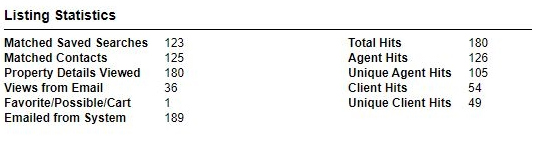
Did you know you can track the number of times your listing is viewed by agents and consumers via Paragon? To access this information, pull up your listing via Listings -> Maintain, and click on Select an Action. From the Select an Action box, choose View Activity Report. Within the report there is a link that defines the statistics displayed.
Jul
12
2023
Did you know the assessor data for many municipalities is available online, for free? This provides an easy way to look up things like the number of bedrooms, bathrooms, finished square footage, year built, and more for a given property.
To locate this information, click Tax in the main Paragon menu and choose Public Records Websites from the dropdown. Select your county on the map, choose the appropriate municipality, and then search by address or parcel #. If you don’t see your municipality listed, you can check AssessorData.org (for free) or purchase the complete property record for a small fee on AssessorData.com.
Jul
5
2023
Did you know you can customize the Market Monitor on the Paragon Home page to limit the display of listings to certain counties, cities, school districts, or types of property? Click the gear to the right of the words Market Monitor to set your preferences:
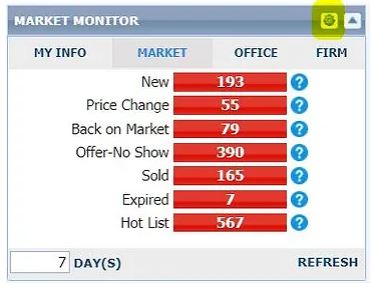
Clicking the My Info Tab on the Market Monitor gives you quick access to your current active listings as well as your current offer-no show listings, your current delayed listings, your listings due to expire for days specified, and your solds for the past 6 months. Listings under the Sold Within Six Months link include your co-broke sales, allowing easy monitoring to be sure you are given credit for co-broke sales.

Jun
27
2023
Photos and video taken via a drone, and loaded into the MLS, must be taken by a drone pilot who is certified to operate a drone for commercial purposes. When hiring a drone operator, please ask for their Remote Pilot Certificate number as issued by the FAA. If you are taking your own drone photos or videos for use within the MLS, which would be considered for commercial use, you must have your Remote Pilot’s Certificate from the FAA. By loading a photo or video tour into the MLS system, members represent that they have the legal right to use and publish said photo or video for commercial use. More information on the operation of drones can be found here.
Jun
21
2023
The following additions/changes have been made to the listing data we collect within Paragon. Updated profile sheets can be found here.
Jun
14
2023
Here are a few tips to ensure your listing is being matched with the maximum number of buyer searches in Paragon:
Jun
13
2023
Create a quick CMA report with just a few clicks with the new Easy CMA feature in Paragon. You’ll find this option under the CMA icon.
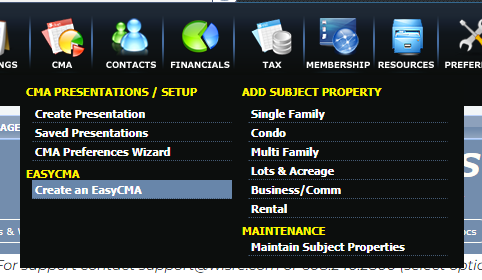
Just add your subject property, and Easy CMA will find 10 comparables for you. You can also add others manually. Then click Generate CMA for a report you can print out or create a link to send.
Jun
6
2023
If you are not currently using Tax Autofill when adding a listing, you may want to check it out. It allows you to automatically pull information such as address, parcel number, municipality, owner, school district, acres, assessments, and taxes from the tax record into the listing input screen in Paragon, saving you keystrokes.
To do this, click the Tax Autofill button at the top of the Add Listing screen. On the Tax Search page that displays, select the county along with the parcel number, address, or owner name, and then click Search. Check the box next to the appropriate tax record, and then click the Autofill button in the toolbar above the results to load the information into the listing input screen. To adjust any of the information that auto-filled, simply overwrite it.
May
31
2023
It is against MLS rules to advertise a property that is listed by another firm without permission from that agent/broker. The only exception is advertising done via an approved IDX website that has been registered with the MLS. IDX sites are only approved if they are controlled by the registered MLS agent/broker, and are clearly identified as such. Social media sites such as Facebook & Instagram do not qualify as approved IDX platforms, so please remember to obtain permission from the listing agent/broker before advertising a listing on one of these sites. This would include posting photos and/or videos of a listing that is not yours.
May
17
2023
Per Wisconsin State Statute 452.136(3), an agent cannot advertise a property unless their firm is the listing firm or has permission from the listing firm. The firm does not become the listing firm until a listing contract has been executed and the term of the contract has begun. This date is also referred to as the effective or list date:

Because state law is not well-defined in regard to what is considered advertising, the MLS Board of Directors created the following rule to stop violations internally & reduce the risk of our members being sanctioned by the DSPS:
If any detail of a specific property, sufficient to activate the interest of a potential buyer, is publicly marketed* before the effective date of the listing contract for said property, the listing agent shall be fined $200 per day, from the time of advertisement until the effective date of the contract. This fine will not exceed $5,000.
*Public marketing includes, but is not limited to: flyers displayed in windows, yard signs, digital marketing on public facing websites, brokerage website displays (including IDX and VOW), digital communications marketing (email blasts), multi-brokerage listing sharing networks (ex: Realtor® Facebook groups), communication which introduces the property to agents outside the listing firm, and applications available to the general public.
If you are unsure if something is allowed, please call 608-240-2800 or email listings@wisre.com. We would much rather talk to you ahead of time than have to issue a fine.
May
10
2023
When setting up showings, you most likely use the driving directions available within ShowingTime.
If, however, you want driving directions for properties before setting up showings, you can do this directly from Paragon:

On the popup box choose a starting point and click Get Directions. This will open the properties into Google Maps and show the suggested route. You can rearrange the order of the properties by clicking and dragging them on the list. There is also an option to send the directions to your phone.
May
9
2023

May
3
2023
In an effort to promote the highest level of professionalism and cooperation, we strongly recommend the following best practices regarding setting a future date for presentation of, review of, or response to an offer:
Buyer Agents:
Listing Agents:
Apr
26
2023
When adding an associated document to a listing in Paragon, it will automatically be set as a private document unless the “Public” box is checked. Public documents are visible to the public via Collab Center & e-mailed listing links, and are also sent to WIREX, where agents in other MLSs can view them. Private documents are not included when listings are emailed from Paragon, but SCWMLS members have access to them via the Documents link on a listing.
Please remember that documents may not be marked public if they contain agent or company names, contact information, or branding/logos. Public documents that are contractual in nature (ex: RECR, addenda) may contain the name of the listing firm, but it must be in typeface no larger than the median typeface of the document. There has been an increase in the number of reports of contact information on public documents, so please double check this before marking a document as public. Thank you!
Apr
18
2023
Did you know the MLS remarks section of a listing is searchable? Within the Advanced Criteria section of your search options (at the bottom under Search), you will find the Remarks search prompt. Simply type in the word or words you are looking for.
For example, if your buyer would like a property that has a large garden space, type large garden and your search results will include properties for which the listing agent has included the words large garden in the remarks. You can also string together multiple words. For example, if your buyer would like a home on a secluded lot, you could type secluded (tab) private (tab) isolated.
Your search will bring back properties for which the listing agent has included any of these words in the remarks. Give it a try the next time you are looking for something there is not a specific search feature for. Also, when composing your remarks, make sure to mention special features not covered elsewhere in the listing features.
Apr
18
2023
We generally see two reasons a new listing is not available for showings right away.
In the first situation, the property is ready for public marketing, but the seller and listing agent decide to pick a launch date, often starting with an open house. It makes sense to enter these listings as Active, as the seller and agent usually want them to be visible to the public. The listings in Active must include the date showings will be allowed in the first line of the public remarks.
In the second situation, the property is not ready to be marketed due to needed clean up, timing for professional photos, desired staging, etc. It makes sense to enter these listings as Delayed, as the listing is not ready to be exposed to the public yet.
Our rules regarding listings not ready to be shown take both situations into account allowing agents the flexibility to market these listings as either Active or Delayed. Click here for more information.
back to top