
Skip Navigation

News & Past Hot Tips

Feb

1

2018

February 2018

February 2018

-Since June 1, we have imported over 3,000 listings from WIREX directly into your SCWMLS database to make it easier for you to find them. These listings are located in the 19 counties our SCWMLS members typically list and sell in. These listings, listed by members of other MLSs, were in the past only available via a separate WIREX search. Metro MLS has done something similar in that their members can also see SCWMLS listings directly in their Flex system without switching to WIREX. Members of both MLSs can now easily find all listings in one single search, see listing detail on these listings, and schedule a showing directly by clicking a button from the listing detail. SCWMLS and Metro MLS continue to work together to keep our database fields aligned, which allows a seamless search experience for their members.

– From your ShowingCart screen, click on the email icon in the top right corner and then type your client’s email address in the To field. Your clients will be emailed a buyer’s version of the showing tour, which they can open on a mobile phone to take advantage of the built-in navigation option.

-The default spreadsheet sort in Paragon is by Price. You probably know you can click on the header of any column to resort the spreadsheet by that column. You can also set a multiple sort for the spreadsheet. When on the spreadsheet view, click Customize from the closest toolbar above, and select Sort. You can select up to 3 levels to sort your spreadsheet by. You can also select Ascending or Descending. This sort order will now be your default sort each time you display the spreadsheet.

-Avoid a $100/day fine: All MLS eligible properties must be entered into the MLS within 4 calendar days of the effective date (first day of the term) of the listing contract. If a seller instructs you to withhold their new listing from MLS for a limited time, that listing must still be entered into the MLS within 4 calendar days of the effective date, but should be entered with a status of Delayed. It is against MLS rules to include verbiage such as “not to be entered into MLS until X” as a means to avoid entering a listing within the required 4 days. If a seller does not want their new listing marketed via the MLS at all, this instruction must be written into the contract for the whole term of the contract. Once your seller has signed a listing contract, that listing begins on the effective date (beginning of the term). You cannot modify the effective date via an amendment once that date has passed. In other words, you cannot undo days a listing was already under contract.

-Clicking the My Info Tab on the Market Monitor (top right on this page), gives you quick access to your current active listings as well as your current offer-no show listings, your current delayed listings, your listings due to expire for days specified, and your solds for the past 6 months. Listings under the Sold Within Six Months link include your co-broke sales, allowing easy monitoring to be sure you are given credit for co-broke solds.

-Updated Resource: Click here for updated 2017 Tax/Mill Rates.
Jan

1

2018

January 2018

January 2018

-Q: My buyer wants a home with at least 2 bedrooms and one extra room. What is the best way to search for this in Paragon?

A: Within the Feature pick list under search Secondary Criteria there is a feature for Z-Other Rooms. Within this pick list select Bedroom, Bonus Room, Den/Office, Sun Room, etc. within the Must Have 1 or More column. Paragon will look for listings that have at least one of these rooms listed as Other Room 1-4.

-The 4-day grace period allowed to gather information before entering a new listing on the MLS, is not a barrier to showings by a potential subagent or buyer’s agent. All MLS eligible properties must be made available for showings on the effective date of the contract, unless the seller has indicated that no showings are allowed for a specific time. Any no showing stipulation would apply to showings for all perspective buyers, including those working with the listing agent.

-Click here for a copy of the 2018 Gregorian Calendar.

-If you receive an email alerting you that a client has opted out of receiving emails from you via Paragon, this may be because they accidently clicked on the opt out link within an email, or because Paragon received a bounce back from your clients email provider. To opt them back in, email them the following link or open the link and type in their email address: https://scwmls.paragonrels.com/CCR/paragonsubscriptions?action=optin. Your client will be sent a confirmation email containing an opt-in option they will need to click on within 72 hours to opt back in. This opt in link can also be found within the links in the orange banner on the top of the Paragon home page. You can proactively check for clients that have been opted out by clicking on Contacts and View/Manage Contacts within Paragon. Look at the Email column. Clients should have an orange envelope indicating a valid email address. If you see a white envelope with a red exclamation point, this client is opted out and is not receiving emails.

Dec

1

2017

December 2017

December 2017

-Newly created Wis. Stat. 452.136 (3) states that an agent cannot advertise a property unless a listing agreement has been executed. It is no longer permissible to advertise a listing as “coming soon” without the existence of a listing agreement.

-Share to Facebook Added: With the update last week, a Share to Facebook option was added within Listing Maintenance. Find this new option under Integrations within the Select an Action box while in Maintain Listing. All Active, Pending, and Sold listings for which you are a listing agent can be selected to appear within your Facebook feed. The post includes the primary photo, public remarks, and a link to the detail report within Collab Center. You will need to have a Collab Center site set up before you can take advantage of this new feature. If you are not currently using Collab Center, you can set up your site under Preferences (in the menu bar at the top of the screen).

-Agent Phone Labels Added: When clicking on an agents name within Paragon, up to five phone numbers will display. These phone numbers are now labeled (Pref, Offic, Home, Cell, Fax). Pref = Preferred number. Offic = the phone number in the office record which cannot be changed in the agent record. Please email member@wisre.com if you want to make any changes to your phone numbers.

-New MLS Offering – Homesnap Pro: SCWMLS members now have the option to utilize Homesnap Pro as an added MLS benefit. There is no charge for this cool new product. Installation instructions: Apple iPhone/iPad or Android. Click here for tutorial videos.

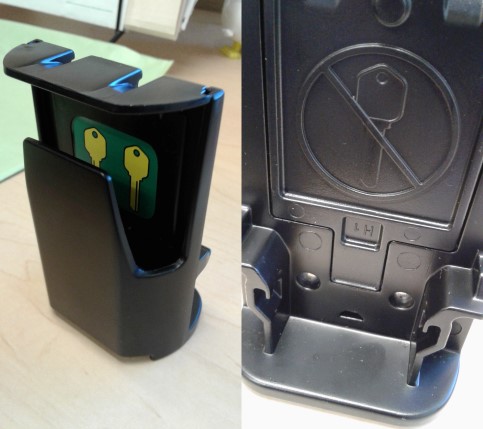
-Don’t be a Keybox Jammer: When placing keys in the new Supra keyboxes, please make sure to put them in the front compartment, where a green sticker with bright yellow keys displays. Do not put them in the back more open area which has a picture of a key with a line through it. If a key is placed in the back, it is likely to jam. For those more visual, click here.

Nov

1

2017

November 2017

November 2017

-Wisconsinhomes.com Framed Website – If you currently use the free framed version of wisconsinhomes.com (www.wisconsinhomes.com/index2.php) as the listing search portion of your website, please let this serve as notice that we will be eliminating this framed option the end of December. We will be transitioning wisconsinhomes.com to a new vendor, which will not allow for a framed option. We are currently working with the IDX vendor, Placester, to offer an alternative. If you are interested in this alternative, please email support@wisre.com for more information.

-Property PIN: With the October database changes, we added a new optional listing field called Property PIN. This field can be used within your office to tie listings to internal processes (i.e. advertising PIN). This field is not on any standard reports, but can be added to spreadsheets and custom reports, and can be searched on. This field is alpha/numeric and has a max character count of 25. The Property PIN field within maintain listing can be found under the Open House/Tour/PIN section.

-Value Price Range Reminder: The price identified as the contractual list price on the listing documentation is the price that must be listed on Paragon in the list price field. Include the range in the first line of the MLS Public Remarks.

Oct

1

2017

October 2017

October 2017

-In the past, listing edit checks required that you enter the dashes and periods as part of a parcel number when entering a new listing into Paragon. As we now are storing the parcel number with and without the punctuation within the tax module, it is no longer necessary to include the dashes and periods when entering your new listing. Paragon will now accept a parcel number with our without the punctuation. An error will still come up if you enter the wrong number of digits.

-Rule Reminder: A new listing contract must be obtained before re-entering an existing listing into the MLS as new. If the MLS discovers a new listing contract was not obtained, the new listing will be deleted and the listing broker will be fined $50. It is not acceptable to draft only an amendment to create a new MLS listing.

-Condo Pets & Parking: If you currently have an active Condo listing, please check to be sure pets and parking are reflected correctly. We have expanded the options for pets, and in doing so converted Small Pets Only to Cats OK and Large Dogs OK to Dogs OK. If your condo allows small dogs, please select the new features Dogs OK and Size Limit. If you had selected 1 Space, 2 Spaces or Outside for condo parking, please note that we have changed these features to 1 Space Assigned, 2+ Spaces Assigned, and Outside Only. Please edit condo parking if these features no longer apply.

-Database Changes: On October 9th, we made several changes to our database. The changes were a result of both member requests and our work to align our data fields with Metro Milwaukee and Northeast WI MLSs. These changes include the elimination of value range symbols, the combination of below/part below grade and non-exposed sqft fields, an increase in the size of the broker-to-broker remarks field, and various pick list feature additions/deletions. A full list of changes can be found here. Updated profile sheets can be found here. Profile sheets have been updated within ZipForms.

Sep

1

2017

September 2017

September 2017

-We are currently preparing for a few data additions/changes scheduled for mid-October. One of the changes that will be made is the elimination of the +, -, = symbols for value range. These symbols have been routinely misused, and have not been handled correctly via data exports, which in turn has resulted in misinformation on public websites. In addition, our MLS partners throughout the state have eliminated value range symbols. To follow the national norm and improve the accuracy of your data, we will require the actual list price of the property be entered within the list price field. If you are marketing via a value range, you will continue to list that range within the MLS public remarks.

-Metro Milwaukee MLS is now including listings from our MLS within their native database. This means that Metro Milwaukee members are no longer required to search within WIREX to find listings entered into the South Central Wisconsin MLS Paragon system. In the past, if you wanted to market a listing to members of the Metro Milwaukee MLS, and wanted to ensure they found it in their native MLS system, you were required to join their MLS. Now, when you enter a listing into the South Central WI MLS Paragon system, it will flow to the native Metro Milwaukee MLS system.

-Agents with standard agent level security can now update broker-to-broker remarks and all pick list features on their listings within Paragon. In addition to these fields, agents can maintain photos, virtual tours, associated documents, map location, public remarks, showing instructions, open house date/time, broker open date/time/comments, and assessment/tax info for all their listings.

-Clicking on the listing company name link from the agent full report will bring up information about the firm including the company’s license number (under Extended Fields). Please try this with one of your listings to make sure we have your company’s license number on file. If this is blank, or incorrect, please email your office license number to member@wisre.com.

Aug

1

2017

August 2017

August 2017

-The ability to assign and unassign keyboxes to listings has recently been added to Paragon. Within Listings – Add/Maintain, you will now see a link titled Supra Lockbox. Click the Assign link in the upper left corner and enter the keybox serial number and shackle code. The listing agent must have an eKEY assigned in order to take advantage of this option. Other thanbeing a good way to keep track of where keyboxes are, once you assign a keybox to a listing, you will see the MLS number and address on Supra reports instead of the keybox serial number. In addition, if you set up notifications to alert you of beginning and ending showings, the alerts sent will better identify which listing is being shown.

-Have you ever run into a situation where you don’t have the shackle code when you go to remove a box? If you store your keyboxes under Inventory in your eKEY app, that information will be at your fingertips. When you open the shackle to place a keybox on a listing, a default question appears asking if you want to Add to Inventory? If you leave this checked, the box will automatically be added to your Inventory. You can also manually add keyboxes to your Inventory (you will need the shackle code). Besides the shackle code, the details under Inventory will tell you the battery life and allow you to link the MLS number. You can also add notes and your business card for the showing agent.

-Thinking about using a drone to take photos of your listing? Aerial photos are cool, but capturing them via a drone requires a license. Please review the NAR Field Guide to Drones and Real Estate for more information.

-Are You Missing Listings? If you have a buyer requesting to be in a specific school district, do not simply search by the municipality you think is serviced by that school district, but rather use the School District search field. There are many instances where school districts span several municipalities, and it is easy to miss listings if you are not aware of all of them. For example, the school district of McFarland spans six different municipalities. If you limit your search to the Village of McFarland, you would miss over 37% of properties serviced by the McFarland School District.

-Significant Change to E-mail Message Body: If you have created a Message Body (different than your E-mail Signature) for your emails sent out of Paragon, please note that on August 23, HTML formatting will be removed within the Message Body function. If you have created a “fancy” message body utilizing HTML formatting (including images, links, varied fonts, colored type, symbols), it will be changed to plain text. The formatting for E-mail Signature(s) within Paragon will not be changed, and thus you could copy your HTML formatted message body to your E-mail Signature. This change is being done to prepare for future enhancements to Collab Center Notifications.

Jul

1

2017

July 2017

July 2017

-Since June 1, we have imported over 800 listings from WIREX directly into your SCWMLS database to make it easier for you to find them. Click here for more information on these listings.

-If a showing is requested or confirmed via Showing Time after 9:00 pm, calls, texts and push notifications will be held until 8:00 the next morning. Email notifications will go out immediately.

-The MLS Remarks section of a listing is searchable. You will find the Remarks search prompt under the Advanced Criteria section of the search parameters. When typing in a word or phrase to search for, put asterisks (* *) around the word or phrase. For example, if your buyer would like a property that is on a trout stream, type *trout* and your search results will include properties for which the listing agent has included the word trout in the remarks. You can also string together multiple words or phrases. For example, if your buyer would like a home on a secluded lot, you could type *secluded*, *private*, *isolated*. Your search will bring back properties for which the listing agent has included any of these words in the remarks. Give it a try the next time you are looking for something there is not a specific search feature for. Also, when composing your remarks, make sure to mention special features not covered elsewhere in the listing features.

-Delayed Listings – A listing can only be in the status of Delayed for 45 days. What happens on the 46th day? On day 46, a listing in Delayed will be moved to MLS Suspended. The listing agent will need to contact the MLS office to move the listing out of MLS Suspended. Depending on the circumstances, updated paperwork from the seller may be required to move the listing to Active. The 45 day rule took effect for all new listings with an effective/list date after June 30, 2017. You will see a few listings with a list date before 7/1 that have a show date more than 45 days in the future. These have been grandfathered in.

– 2 MLS Rule Changes:

Change #1 – The Board of Directors recently voted to reduce the grace period for the entry of new listings from 7 calendar days to 4 calendar days from the effective date/list date of the contract. Why? Here are the factors that were considered:

  • Many reported instances of agents posting a new listing, complete with photos, on public websites (e.g. Zillow, Facebook) days before the listing is loaded into MLS. The listings in these instances are ready for public viewing, but the listing agent waits until the last day possible to load them in MLS. Buyers seeing these listings on the public websites do not understand why their agents cannot find them on the MLS.
  • 86% of new listings are already being loaded in the MLS within 4 days.
  • Other MLSs in the state have shorter time periods (i.e. Metro Milwaukee allows 48 hours). Over the past few years we have been working to normalize data and rules between MLSs in the state.
  • Now that we have the status of Delayed, agents have a place to put listings if they don’t have everything ready to go by day 4.

Change #2 – The Board also voted to set a maximum of 45 days that a listing can be set as the status of Delayed. Why? The MLS is an offer of cooperation. If a listing will not be ready for a cooperating agent to sell within a reasonable number of days, it is not appropriate for that listing to be included on the MLS. Agents and buyers are very frustrated when they see a property they are interested in on the MLS, but they cannot see it in a reasonable timeframe.

Both of these changes will take effect for listings with an effective/list date after June 30.

Jun

1

2017

June 2017

June 2017

-Search Made Easier: We are now pulling non-SCWMLS listings, with a list date of 6/1/17+, that are located in the geographic area SCWMLS members typically market in* from WIREX directly into the SCWMLS database. This means that when you do a search within the SCWMLS system for listings in any of these counties, all listings (listed after 5/31/17) will come up even if some of them were input into a different MLS. You will no longer need to switch to WIREX to find these listings. WIREX will still be helpful if you are searching outside this area. The MLS numbers for these non-native listings will be the number that was assigned when it was input into its native MLS, but will be prefixed by 2 letters to make the number unique, and to identify them as being listings that originated in a different MLS system. For example, listings from Metro Milwaukee MLS will be prefixed with MM. You will need to include the alpha prefix as part of the MLS number when searching by MLS number. The native MLS will also be listed within the disclaimer at the bottom of the agent full report.

If your office currently enters the same listings into SCWMLS and another MLS that participates in WIREX, beginning with properties listed 6/1/2017+, we would like you to only enter them into the other MLS and let them flow to Paragon. Besides the time saved in entering the listing, other advantages are the same MLS number will be used in both systems, and all subsequent changes will also automatically be made. If you choose to continue to enter the same listing into SCWMLS and another MLS, we will delete the non-SCWMLS listing once it hits Paragon as we do not want duplicate listings within Paragon.

*Adams, Columbia, Crawford, Dane, Dodge, Grant, Green, Green Lake, Iowa, Jefferson, Juneau, Lafayette, Marquette, Monroe, Richland, Rock, Sauk, Vernon, and Waushara counties. We plan to add listings within Fond du Lac, Jackson, Walworth and Wood counties before the end of the year.

May

1

2017

May 2017

May 2017

-The Board of Directors recently voted to reduce the grace period for the entry of new listings from 7 calendar days to 4 calendar days from the effective date/list date of the contract. This change will take effect for all new listings entered after June 30.

-The grace period allowed to gather information before entering a new listing on the MLS, is not a barrier to showings by a potential subagent or buyer’s agent. All MLS eligible properties must be made available for showings on the date of listing, unless the seller has indicated that no showings are allowed for a specific time. Any no showing stipulation would apply to showings for all perspective buyers, including those working with the listing agent.

-Listings in the status of Delayed or Active marked as no showings until cannot be shown to prospective buyers by a cooperating agent or by the listing agent. In addition, agents from companies other than the listing company are not allowed to preview these listings. Those found in violation of this rule can be fined up to $15,000 and are subject to suspension of MLS services. This fine and suspension can be applied to both the listing agent and the agent showing the property.

-A WRA Legal Hot Tip from May 1 addresses the growing practice of setting a specific date for the presentation of offers. Within this hot tip it states, “there is a serious risk that while a strategy to indicate an offer presentation deadline, or an offer submission deadline, may ratchet up interest among buyers and get them to act quickly, it may inflict harm in the marketplace”. For the complete Hot Tip, click here.

-Don’t forget about your eKEY app when you upgrade your phone. When upgrading, you will need to reinstall the eKEY app and reauthorize via a new 30-digit code. Authorization codes are available from the following sources:

  • MLS staff (608-240-2800 option #2)
  • Supra Technical Support (877-699-6787)
  • SupraWEB

To make it easier to get technical help from Supra, have your eKEY serial number handy. We suggest you save the Supra Tech Support phone number (877-699-6787) as a contact in your phone, and add your serial number as a note in the contact file. You can find your serial number at the top of your eKEY screen (eKEY Basic-1234567).

-If your listing is in the status of Offer-Show, you must allow showings. Please keep in mind that the status of Offer-Show displays on public websites as well as in the MLS. When a consumer sees the label Offer-Show, they are expecting to be able to see that property. It reflects badly on your profession as a whole when the consumer is denied a showing on a property that is clearly marked as Offer-Show. If you are no longer showing a property that has an offer, please move it to Offer-No Show immediately.

Apr

1

2017

April 2017

April 2017

-By default, there is a calendar in the lower right corner of the Paragon home page. Those with broker/manager/administrative access can post events for display on their agents’ calendars. Click the green plus sign to add an event. Enter the event title, location and select Personal, Office or Firm. Selecting Office will display the event to just those in your branch office. Selecting Firm will display the event to all agents in your company. Those with agent level access can post personal reminders. If you utilize the Tasks feature within the Paragon Contact Manager (located under More Information within the contact), these tasks will display on your Paragon calendar as personal reminders.

-If you work within a team and would like your team name to be included on the bottom of the customer full reports, email support@wisre.com with your team name. After we add your team name to your member record, you can customize the customer reports by clicking on Preferences, Views/Reports, and the Details tab. Open up the report you would like to change and scroll down to the bottom section in white. Double click on the white box to display the fields you can include. Select My Info – Team Name, which is located a little more than half way down. Highlight this field and click Add. Place a check mark next to the Team Name and next to No Label at the bottom and hit Save & Close. At this point, the Residential report is done. You will need to do this for each class of property. Your personal slogan can also be added in this same fashion.

Mar

1

2017

March 2017

March 2017

Showings on Properties Outside SCWMLS: Now that most MLSs in Wisconsin utilize ShowingTime, we are in the process of adding the Schedule a Showing link within WIREX. In the meantime, if you need to schedule a showing on a property listed through a different MLS, you can do this directly from the ShowingAssist program which is integrated in the SCWMLS database within Paragon. When logged into South Central Wisconsin MLS (not WIREX), click on Preferences and ShowingAssist. From the menu on the left, click on Showings and Make New Request. Search for the listing by MLS number or address. From there the interface will look familiar.

-Showing Setup Enhancement: Photography, Broker Price Opinion, and Walk-Through have been added to the list of Showing Types when setting an appointment via the Schedule a Showing link. In addition, a sub-menu under the Inspection option for type of inspection (i.e. septic, pest, radon drop off/pick up) has also been added.

March 22 Enhancements/Bug Fixes:

-The status label for Pending has been changed to Offer–No Show to better describe what is represented and expected when listings are in this status.

-E-mailed listings from Paragon, when viewed with a mobile device, will display using a more mobile friendly view. There is still an option to switch to the full desktop version of the report within each email.

-The maximum character length of photo labels has been increased from 16 to 30.

-Within Client Connect, you can now isolate Favorites, Possible, and Rejected listings by individual search when multiple searches are present.

-Spell check within email has been restored.

-Error when using Chrome version 57 when attempting to email has been resolved.

– If you are looking for property on the fringe of the South Central WI MLS area, please remember to check WIREX. Even if you think you are close to the fringe, please check WIREX. MLSs do not have set boundaries, so the fringe can be somewhat blurry. When in doubt, check WIREX. It is free! All members of the SCWMLS have access to MLS listings from eight other MLSs in Wisconsin via WIREX. There is no additional charge for WIREX. Currently, there are 56,000+ active listings in the WIREX database. To put this in perspective, our MLS currently has 12,500 active listings. WIREX covers all counties in Wisconsin with the exception of Florence, Forest, Iron, Langlade, Lincoln, Oneida, and Vilas Counties. Click here for a coverage map. To access WIREX, simply select WIREX on the drop down during Paragon login; or when in Paragon, click on the MLS Switcher link at the top of the screen. The search screens in WIREX have been set up to look very similar to the search screens in SCW Paragon, so you should feel very comfortable using WIREX.

-If you are including a home warranty, use the new Includes field to indicate specifics such as type, cost and company.

-If you have a listing that is not mapped correctly, it may be missed if an agent is searching by map. Please make it part of your routine to always check the map placement when adding a new listing. If the map placement is not correct, you can adjust it under Listing Maintain – Change GeoCode. When the map displays under maintain, click on the orange map placement marker and move it as needed. Switching to a bird’s eye view (click the down arrow next to the word Road in the upper left corner) and using the zoom feature helps to pinpoint the exact location. There is also an option to enter the latitude and longitude. Before clicking Save, you may want to zoom out a bit as the zoom level will also be saved.

-When you receive an accepted offer, you have 3 calendar days to change the status of that listing to either AC (Offer-Continue to Show) or Offer-No Show. The only exceptions are if there is a bump clause in the offer or a short sale situation. If there is a bump or if the property is a short sale, you have 3 calendar days to either change the status to Offer-No Show, AC, AB (Offer with Bump), or you can leave the status as Active, but you must disclose the existence of the offer in the broker-to-broker remarks (Accepted Offer Bump Clause or Accepted Offer Short Sale).

-Thinking about using a drone to take photos of your listing? Aerial photos are cool, but capturing them via a drone requires a license. Please review the NAR Field Guide to Drones and Real Estate for more information.

Feb

1

2017

February 2017

February 2017

-Click here for updated 2016 Tax/Mill Rates.

Q: Last week I entered a new listing 5 days after the list date as Delayed, changed it to Active today, and days on market show 5 days Why?
A: For all listings, days on market starts counting at List Date and subtracts days in an off-market status. As this listing was entered 5 days after the list date, the time between the list date and the day entered was counted. If you want to avoid a days on market calculation for your Delayed listings, you should enter them on the list date. For days on market calculations, the list date is day 0 and the day after the list date is day 1.

-Our Type feature pick list contains three distinct stages for properties under construction or newly built. It is important to update this feature as a home moves from plan, through construction, to finish. Select Building Plans with Lot for proposed homes not yet started, select Under Construction once a hole has been dug, select New Construction/Never Occupied to indicate the new home is finished. While under construction, you must also include the estimated completion date or stage of completion in the first line of the public remarks. A photo is required once the home hits the new construction/never occupied stage. If you show a property and find it is not labeled correctly, please let us know and we will follow up with the listing agent.

Jan

1

2017

January 2017

January 2017

-Our new Supra key system allows you to set email or text alerts when an agent opens your keybox, and when they leave your listing. You can also send this alert to your seller or team member(s). Alerts can be set up via www.supraekey.com. If you are new to this website, you will be prompted to set up an account (hint: your key serial number displays at the top of your ekey screen). Click here for detailed instructions on setting up showing alerts.

-My buyer wants a home with at least 2 bedrooms and one extra room. What is the best way to search for this in Paragon? Within the Feature pick list under search Secondary Criteria there is a new feature for Z-Other Rooms. Within this pick list select Bedroom, Bonus Room, Den/Office, Sun Room, etc. within the “Must Have 1 or More” column. Paragon will look for listings that have these rooms listed as Other Room 1-4. Do not use the “Must Have” column unless you are looking for just one specific type of room (i.e. Exercise Room) or if you must have all the rooms you are selecting.

-If a seller does not want their new listing marketed via the MLS, this instruction must be written into the contract for the whole term of that contract. If a seller instructs you to withhold their new listing from MLS for a limited time, that listing must still be entered into the MLS within 4 days of the effective date, but should be entered with a status of Delayed. It is against MLS rules to included verbiage such as not to be entered into MLS until X as a means to avoid entering a listing within the required 4 days.

-Click here for a refresher on other MLS rules pertaining to listings.

-Click here for a copy of the 2017 Gregorian Calendar.

-The Paragon banner at the top your screen can be fun-a-tized. For example, you can pick a favorite color, a winter theme, or a beach theme if you are already sick of winter. To spice up your winter, select Preferences, System, User Interface and Select a Theme.

Dec

1

2016

December 2016

December 2016

– Looking for square footage? On the bottom of the Paragon home page, there are six orange buttons that link to useful information. One of these buttons is labeled Assessor Sites, and will take you to a county drop down and from there a list of municipalities. These links will then take you to the assessor website for that specific municipality. Often the assessor sites have square footage detail. If you do not see the municipality you need, try www.assessordata.org. If you still have no luck, try www.assessordata.com. This last site includes detailed assessor data for $1.20 per property. If we are missing a site that you have, please share. Send it to support@wisre.com.

-Listings in the status of Delayed or Active marked as no showings until cannot be shown to prospective buyers by a cooperating agent or by the listing agent. In addition, agents from companies other than the listing company are not allowed to preview these listings. The portion in bold italics is a recent change to MLS rules.

-Your eKey updates via the Internet early each morning. This is the only time your eKey needs access to the Internet. Once updated, you can open keyboxes without access to the Internet. If your eKey encounters a problem during its morning update, the Update Key icon will display with a red X through it. Please get used to checking the Update Key icon before going out on showings to make sure a red X does not display. If there is a red X, you can perform a manual update by pressing the Update Key icon. If this does not work, you can call KIMVoice for an update code. KIMVoice can be reached at 1-888-968-4032 or 1-877-788-4220. You will receive a 10-digit number to enter in your ekey app. As the KIMVoice numbers are not listed in your ekey app, we suggest you set up a Contact with these numbers. The general Supra Technical Support phone number comes up in the About section of your EKEY app (second screen). You can also get update codes here, but there are a few extra steps.

-Are you still using a Supra ActiveKey? If yes, please upgrade NOW. All ActiveKeys have been shut off. Click here for upgrade instructions.

-The Client Connect interface has been updated for the end-user client. The main reason for the update is to make Client Connect more mobile friendly. The functionality is basically the same, however the look and navigation have changed. You may want to check out the new interface so you are familiar with what your clients are now seeing. The easiest way to do this is to pull up your contact list and click any blue Site button to be taken to that client’s site. Your agent photo may require adjustment to fit into the new format. There is a crop tool within Client Connect Preferences that can help with this. The old home page message has been converted into a new “About Me” link, so you may want to review this verbiage.

-In order to ensure listing history is linked & properties are mapped correctly, please enter street names in accordance with MLS guidelines (available here). Some of the lesser known rules include:

  • All alphabetic county roads should be entered as County Road (ex: County Road K)
  • All numeric state highways & interstates should be entered as Hwy (ex: Hwy 51)
  • If the street number begins with an alpha character (ex: N1234), please enter it in the street number field (not the directional field).
  • Vacant land that does not have a street number assigned should be entered with the lot number in the street number field. Please use the format: L24 (rather than Lot 24). If there is no lot number, list the acreage: 41.25 Ac.

Oct

1

2016

October 2016

October 2016

-Database changes were done last week: Click here for a list of these changes. New profile sheets to accommodate these changes can be found here.

-Two new Sale Factor options have been added when changing a property to Sold. These join the list of Court Approved, REO, and Short Sale are Non-Arm’s Length and Relocation.

Sep

1

2016

September 2016

September 2016

-Attention eKEY/iPhone Users: A new Supra eKEY app for iOS 10 is now available in the Apple app store. You need to update your eKEY app to this new version before you update your iPhone or iPad to iOS 10.

-A new showing restriction has been added to ShowingAssist (Preferences -> ShowingAssist -> Listing Setup -> Appointment Restrictions) to allow you to easily block same day showings per listing. You can also adjust required and suggested lead times per listing in this section. If your office has upgraded to Showing Time’s ShowingDesk or Appointment Center, these options are controlled outside of Paragon.

-The default spreadsheet sort in Paragon is by Price. You probably know you can click on the header of any column to resort the spreadsheet by that column. You can also set a multiple sort for the spreadsheet. When on the spreadsheet view, click Customize from the closest toolbar above, and select Sort. You can select up to 3 levels to sort your spreadsheet by. You can also select Ascending or Descending. This sort order will now be your default sort each time you display the spreadsheet.

-If you have a listing that is not mapped correctly, it may be missed if an agent is searching by map. Please make it part of your routine to always check the map placement when adding a new listing. If the map placement is not correct, you can adjust it under Listing Maintain – Change GeoCode. When the map displays under maintain, click on the orange map placement marker and move it as needed. Switching to a bird’s eye view (click the down arrow next to the word Road in the upper left corner) and using the zoom feature helps to pinpoint the exact location. Before clicking Save, you may want to zoom out a bit as the zoom level will also be saved.

-The standard MLS Associated Documents for Farm, Auction and Limited Service have been newly added to ZipForms. You can also find SCWMLS profile sheets on ZipForms.

Aug

1

2016

August 2016

August 2016

-New Supra Keyboxes and Keycards to be Distributed Late Fall: The MLS Board of Directors recently voted to renew our contract with Supra for the next generation of keyboxes and keycards. Our current keyboxes are reaching their 10-year battery life expectancy, and Bluetooth technology is now available. The new system will operate 100% via smartphone/eKey. Yes,this means your keycard will be an app on your smartphone; you will not have an option for a separate device. This is a preferred offering as your smartphone and the new keyboxes can communicate directly via Bluetooth without the need for a FOB. Those currently using the eKey will simply eliminate the FOB once old keyboxes have been swapped out. Details of the exchange are still being finalized and will be forthcoming. You will need to return keyboxes currently in your possession, so please start rounding up the ones rolling around in your trunk and in the deep dark corners of your garage.

-Clicking the My Info Tab on the Market Monitor (top right on this page), gives you quick access to your current active listings as well as your current offer-no show listings, your current delayed listings, your listings due to expire for days specified, and your solds for the past 6 months. Listings under the Sold Within Six Months link include your co-broke sales, allowing easy monitoring to be sure you are given credit for co-broke solds.

-When arranging photos, if you end up with a blank box between photos, you can simply drag that blank photo graphic to the end instead of moving each photo ahead by one space. If you leave a blank box, Paragon is smart enough to ignore it in the slideshow, but reports with multiple photos and some data exports are not as smart. Bottom line — don’t leave blank spots between photos.

-You can search for upcoming open houses under the Search Program in Paragon. Click on Search and select the property class. Open up the Advanced Criteria section at the bottom to find the Open House Date search prompt to search for a specific date, or a Yes/No option to find all upcoming open houses. If you have a client who would like to be notified of open houses within their search area, you can include Open House = Y as a criteria in their saved search.

Recent Paragon Updates:

-The ability to set 0 as days back within your personal Market Monitor defaults. 0 days represents changes from just today, whereas 1 represents changes from today and yesterday. The system default will remain at 1.

-When cloning a previous listing, you now have the ability to include photo labels.

-The ability to go from tax search directly to full view in Tax has been restored.

Jul

1

2016

July 2016

July 2016

-A field for Above Grade Bedroom Count is available within Paragon. This field is not entered by agents, but rather calculated using the level designations (Upper and Main) for bedrooms. This field is not visible via default, but you can customize your search screen and/or spreadsheet to utilize this field. If you need help finding this field, please give us a call (608.240.2800).

-A room is considered to be above grade only if the entire level that room is located on is above ground level. A finished room that has exposure (at least 8% of square footage is window space), but is on a level that is not completely above ground level, should be included as Finished Part of All Below Grade. Click here for a must have resource to help you classify square footage correctly.

-Are You Missing Listings? If you have a buyer requesting to be in a specific school district, do not simply search by the municipality you think is serviced by that school district, but rather use the School District search field. There are many instances where school districts span several municipalities, and it is easy to miss listings if you are not aware of all of them. For example, the school district of McFarland spans six different municipalities. If you limit your search to the Village of McFarland, you would miss over 37% of properties serviced by the McFarland School District.

-A link to the Google street view has been added to the Agent Full Report. Look for this new link under the photo, at the beginning of the directions.

-Beginning July 6, if the status changes on a listing you have an upcoming showing scheduled for, you will receive an email alert from ShowingTime alerting you of this status change.

Jun

1

2016

June 2016

June 2016

-The MLS sends listings to Zillow and Trulia for offices that have requested to opt in. If an agent claims their listing on Zillow or Trulia, and makes a change to a field other than price, status, open house info or photos, that change will lock that field, and no subsequent changes done in Paragon will update to that field. For example, if you change the remarks directly on Zillow or Trulia, and then weeks later make a change to the remarks in Paragon, the change made in Paragon will not flow to Zillow or Trulia and you will need to change the remarks in Zillow and Trulia manually.

-Showing appointments via the Schedule a Showing button now default to 1 hour instead of 15 minutes. You still have the ability to easily override this per appointment, and can now set a default showing length via your Agent Setup under Preferences – Showing Assist. Appraisers, for example may want to increase this default. Appraisers can also change their default showing type from Showing to Appraisal within this same section.

-Quickly load a previous search you did in Paragon by selecting the Last Search option located above Primary Criteria after selecting Class. Hovering over Last Search will display the 5 previous searches you performed. Clicking on one of these searches will load the search criteria for that past search.

-It is against MLS rules and copyright law to copy another agent’s photos and associated documents for use on your listing without permission. Those submitting photos/associated docs with the knowledge that they do not have the right to use said photos/associated docs will be subject to a fine of $25 per photo/document in addition to any legal remedies available to the owner of the photos/documents.

back to top