Skip Navigation

News & Past Hot Tips

Jul

28

2022

No Company/Agent Branding

Associated documents marked as public, photos, and virtual tours within Paragon should not contain office/agent names, branding, logos, or contact information.   Our members are doing a pretty good job regarding photos, but we unfortunately have to reach out often regarding branding on public associated documents. Only public associated documents that are contractual in nature (ex: RECR, addenda) may contain the name of the listing firm, which must be in typeface no larger than the median typeface of the document. Please double check your docs before marking them as public.

Jul

22

2022

Agent Preview for Emails

Do you have contacts in Paragon for whom you would like to preview listing matches before sending?

If you use Collab Center, you can set up the contact for Agent Preview. Open the contact, go to Contact Information, select Agent Preview from the Collab Center Search Options located in the top left, and click Save. When a listing notification is sent, it will come to you first to Approve or Disapprove in Paragon. This approval/disapproval can be done directly from the contact grid.

If you use Email Notification, you can edit the notification so it is only sent to you. Open the contact, click Buyer Activity, click the search name, then click Email Notification 1. Click the Edit Notification button at the top. Remove the contact’s email address, check the Bcc Me box, and click Save. Be sure you clearly identify the contact in the subject line so you know who to forward the email to when you receive it.

Jul

11

2022

Correct Map Placement

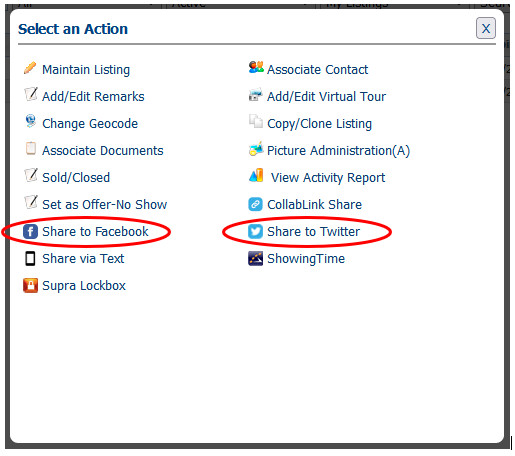
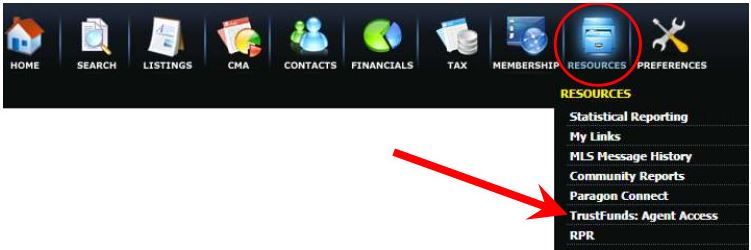
If you have a listing that is not mapped correctly, it may be missed if an agent is searching by map. Please make it part of your routine to always check the map placement when adding a new listing. If the map placement as assigned by Paragon is not correct, you can adjust it under Listing Maintain – Change GeoCode. When the map displays under maintain, click on the red map placement marker and move it as needed. Switching to a bird’s eye view (click the down arrow next to the word Road in the upper left corner) and using the zoom feature helps to pinpoint the exact location. There is also an option to enter the latitude and longitude. Before clicking Save, you may want to zoom out a bit as the zoom level will also be saved. If you are not familiar with the location of a property, the CRS tax program can help you pinpoint it exactly using the latitude and longitude. Click on the red T from the listing to pull the property up within the CRS tax program.  The Latitude/Longitude are the last field within the Location section. Copy and paste into the Change GeoCode option within listing maintain.

Jun

30

2022

Change for Supra eKey Non-Member Access (NMA) Process

The number one complaint we hear regarding our Supra system, is that it is cumbersome to issue an NMA one-time code to allow members from another MLS, and contractors access to a Supra keybox.  An update has been installed that significantly simplifies this process.

If you routinely issue NMA one-time codes for Supra, please check the version of your eKey app (go to More and About) to make sure you have the latest version, which is 5.5.0.468 for Androids and 5.5.3.670 for iPhones.   With this version, you should have the new streamlined option, Grant Managed Access.

In a nutshell, the new one-time access process works as follows:

  1. Tap My Keyboxes
  2. Select the keybox (add if not there)
  3. Select Grant Managed Access
  4. Enter the cell number of the person needing access
  5. Set the desired access date and time

See below for more detailed instruction outlining this streamlined process:

For Listing Agent:
         Granting Single Access to Supra Keybox                      VIDEO        PDF Doc

For Outside MLS Showing Agent or Contractor:
Using Single Access Invite to Open Supra Keybox     VIDEO        PDF Doc

Jun

24

2022

Rule Reminder

The status of Withdrawn by Seller should be used when a seller changes their mind about selling, but the listing agent does not release them from their listing contract.  Properties in Withdrawn by Seller may not be marketed or shown.  Just like with Delayed properties, if the listing agent allows a showing, or a potential co-broke agent shows a property in Withdrawn by Seller status, both agents would be subject to fines by the MLS.

Once a listing is moved to the status of Withdrawn by Seller, the listing firm will not be able to move it back to Active. Before marketing & showings can resume, one of the following must be done:

  1. Execute a new listing contract, expire the previous listing in the MLS, and add a new MLS #. This option will cause the days on market (DOM) count to reset. The cumulative days on market (CDOM) will only reset if the property has been off the market for at least 31 days.
  2. Execute an amendment with the direction to reactivate the listing and submit it to listings@wisre.com. MLS Staff will change the listing back to Active status. This may only be done once per listing. With this option, the days on market will continue to accrue.

If you have a situation where the seller wants to temporarily suspend showings, you should leave the listing as Active, indicate in the first line of the public remarks that there are no showings allowed and provide the date showings will resume. You can change this date if needed.

If the listing agent releases the seller from their listing contract, the status should be changed to Expired.

Jun

16

2022

Reminder Regarding Drone Photos and Video

Photos and video taken via a drone, and loaded into the MLS, must be taken by a drone pilot who is certified to operate a drone for commercial purposes.   When hiring a drone operator, please ask for their Remote Pilot Certificate number as issued by the FAA.    If you are taking your own drone photos or videos for use within the MLS, which would be considered for commercial use, you must have your Remote Pilot’s Certificate from the FAA.   By loading a photo or video tour into the MLS system, members represent that they have the legal right to use and publish said photo or video for commercial use.  More information on the operation of drones can be found here.

Jun

8

2022

Annual Supra eKEY Billing

The Supra eKEY annual renewal is June 1 of each year. The annual fee of $175 per keyholder will be included on your office’s billing statement scheduled to arrive this week.  If you are not using your eKEY, and would like to cancel your lease, please email keys@wisre.com by June 30 for a credit.  Please do not submit an individual agent payment.  Most offices collect MLS fees from their agent, and pass that payment on to MLS.

Jun

2

2022

Price Comparison Tool

Within Paragon, there is an easy way to see the number of potential buyers (Paragon contacts with saved searches that match your listing) at the current list price, and if the price were changed.  This functionality is available for partial listings, as well as live listings.   Check out this short video demonstrating this cool feature.


Rule Reminder:    Listings no longer available for showings due to an accepted offer must be moved to the status of Offer-No Show (PND). It does not matter if all contingencies are removed; the deciding factor is if showings are allowed or not. Please make this change as soon as possible. MLS rules mandate this change must be done within 3 days of when the property is no longer available for showings.


May

25

2022

Sun Prairie High & Middle School Changes

In the Fall, Sun Prairie will have two high schools (grades 9-12) and three middle schools (grades 6-8).   Options in Paragon for Sun Prairie High School have been updated to reflect Sun Prairie East and Sun Prairie West.  All current listings with Sun Prairie listed as the high school have been updated to Sun Prairie East.  If your listing is in the Sun Prairie West boundary, please modify your listing.   We have also added an option for Central Heights Middle School.  Here is a link to a map showing the new middle and high school boundaries.   If you are unsure based on the map, here is a link to the district’s school locator tool.

If you have a saved search using Sun Prairie high or middle schools, you will need to update it to include these changes.

May

16

2022

ShowingTime Home App for Buyers & Sellers

Home by ShowingTime enables your clients to stay involved as you work together to buy or sell their home. Buyers can easily view upcoming tour information, as well as driving directions for scheduled showings. Clients who are selling homes can receive showing requests automatically, confirm them, see feedback from potential buyers and view all activity on their home. Home by ShowingTime keeps your clients connected and engaged throughout the home buying and selling process. Home is part of the base ShowingTime product sponsored by MLS.    Click here for information on incorporating Home by ShowingTime.

May

10

2022

Keybox Access for Listings Outside of SCWMLS

Members of the South Central WI and Rock Green MLSs have access to open Supra keyboxes on properties listed by SCW and Rock Green MLS members only.   Each MLS in Wisconsin has its own, and separate, keybox system.  When setting up a showing on a listing imported into Paragon from another MLS (MLS number prefixed with 2 alpha characters), do not take for granted there will be a Supra keybox, and that you will be able to access it.

Most agents in the Metro Milwaukee MLS (MM prefix) use the SentriLock keybox system. Metro agents can issue a one-day code to allow you access. Most agents in the Northeast (NE prefix) and Central WI (CW prefix) MLSs use the Supra system, but it is separate from ours.   If you want to show a NE or CW listing, email keys@wisre.com and request reciprocal Supra access. Indicate which system you would like reciprocal access for based on the alpha prefix. You need to do this only one time per MLS system, and there is no additional fee for this reciprocity.  Please do not wait until you are at the property to call for reciprocal access, as it takes effort from staff at both the SCWMLS and the reciprocating MLS to get this set up.

Apr

21

2022

Entering Sold Comps

When entering a comp sale (listing sold outside MLS), instead of just entering “sold comp” in the remarks, please include features of the property that are not addressed in our pick lists, especially if there is something unique. Accurate and complete data makes our MLS database more useful for everyone using it. Thank you!

Apr

21

2022

How to find your MLS Agent ID

Within Paragon, each agent is assigned a User Code and a User ID. If you are asked by a vendor (i.e. website provider) to provide your MLS ID, they could be referring to either of these codes, depending on which field they have incorporated for their product. You can find both of these numbers within the Paragon Agent Roster. Click Membership from the top menu bar, and then Agent Roster. Enter your last name within either the Agent Name or Agent ID field. The results will display both your User Code and your User ID. You can either clarify as to which field they are looking for, or just send them both codes.

Apr

13

2022

Import Showing Appointments from ShowingTime to your Calendar

ShowingTime provides a calendar sync option that allows you to merge your showing appointments into your personal calendar. To facilitate this sync from within Paragon, click on Preferences and Showing Assist. Click the Edit Profile button to open your profile. Click Calendar Sync under your photo. From here you will have an option to sync your showings as a showing agent and/or listing agent. Click the Create Calendar Sync Link to create a link. Copy and paste this link into the settings within your calendar program. Directions for Google, Yahoo, and Outlook be found here.

Apr

5

2022

Option to Accommodate More Showings

The ShowingTime default is set to allow 2* showings at a time. This default can be changed for all listings within an office, for all listings for an agent, or listing by listing via the Office, Agent, or Listing setup options within ShowingTime. Options exist for no overlap, or for overlaps of 2-10 showings at a time. If more than one showing is allowed, the showing agent will see a pop-up letting them know another party may be present.

The ShowingTime default for maximum time allowed for a showing is set for 30 minutes*.  You can adjust this listing by listing.  If you anticipate many showing requests for your new listing, for example, you could set the maximum showing duration to 15 minutes to allow for more showings the first few days.  Once you feel the initial rush is past, you could lengthen it to 30 minutes.  You can find this setting from within Paragon. Click on Preferences -> ShowingAssist -> Listings. Select the listing and scroll down to Appointment Restrictions. Look for the Maximum Appointment Length drop down.

*The default may be different for you if your office has already modified this default. 

Mar

31

2022

Updated Resource

Click here for 2021 Tax/Mill Rates

Mar

23

2022

Showing Overlaps Causing Issues for Sellers

With the increased instances of showing overlaps, it is tempting, and even seems friendly to just hand the key over to the next agent that shows up for a showing.  Remember, the Supra system records when you open a keybox, and when you close it.   If the next agent forgets to turn lights off, lets the cat out, or fails to shut/lock doors, you may be held responsible as you would have been the last agent recorded as entering.

We have had an increase in complaints recently, that showing agents are not taking time to make sure lights are off and doors are locked.  If there is not another showing happening when you leave, please double check all doors and lights.  Doors may have been opened or lights may have been turned on by an agent before you, so please be attentive and do a double check before you leave.

Mar

22

2022

Keybox Access Hours Change with Daylight Savings Time

Supra keyboxes come from the factory preset to open between the hours of 6:00 a.m – 9:00 p.m. Central Standard Time, and shift to the hours of 7:00 a.m. – 10:00 p.m. during Daylight Savings Time.

If you would like to change the access hours, or remove all time restrictions, you can do this for keyboxes you have added to your inventory.  Once added, select the keybox and then select Program Keybox.  Change the start or end time by clicking or tapping on the time.  When done, you will need to select to Program the keybox.  You will need to be near the keybox and have the shackle code to do this.

Mar

11

2022

New Training Videos – Overview of Listing Rules

Join our Data Integrity Manager, Heather Brooks, as she steps through MLS rules pertaining to listings.   This is a great review for listing agents and administrative staff.

Mar

8

2022

Best Practices when Setting a Future Date for Offer Presentation/Review/Response

In an effort to promote the highest level of professionalism and cooperation, we strongly recommend the following best practices regarding setting a future date for presentation of, review of, or response to an offer:

Buyer Agents:

  • It is best to submit offers in a timely manner, and not wait until the deadline. The seller is free to change their mind, and the date set for presentation/review/response could change at any time.
  • Open communication with the listing agent is key. If you will be writing an offer, let the listing agent know, and ask to be notified if the date changes.

Listing Agents:

  • Under Wis. Admin. Code § REEB 24.13(3)(c) and the Realtor® Code of Ethics, listing agents are required to promptly present all written offers to their sellers. Holding offers, even at the request of a seller, creates potential risks for the listing agent. If a seller insists on setting a specific date for presentation of, review of, or response to offers, this should be documented in writing, preferably in the listing contract.  Language should be clear as to the terms and conditions under which an offer should not be promptly presented.
  • Terminology such as “presentation”, “review”, or “response” date is sometimes misused, making it difficult for cooperating agents & buyers to understand the seller’s timeframe & intent. Instead, a statement like “Seller requests binding acceptance through ______(date)” may help avoid ambiguity and confusion.
  • Discuss with your seller how to handle offers written with binding acceptance dates prior to the set date for presentation/review/response.
  • To promote fairness & equal opportunity to all interested parties, the listing agent should communicate with all agents who have shown the property, have upcoming showing appointments, and who have expressed interest if the originally stated date changes.  This can easily be done via ShowingTime Appointment Center (select listing and select Send Notifications). The change should be documented in writing, and the MLS remarks should be updated as soon as possible.
  • Listing agents should not make the decision that one offer warrants presentation before the deadline, while others do not. In order to fulfill their obligation to be fair and honest to all parties, the listing agent should present all offers if the decision is made to present one. The seller and the listing agent should recognize that reviewing/accepting an offer before the originally stated date puts cooperating agents in an unfavorable position because other buyers may become angry if they rely on the MLS information only to discover another offer has been accepted.

back to top