As a quick update to our previous communication, ShowingTime will begin rolling out two-factor authentication (2FA) on August 25, rather than August 18 as previously communicated.
This change will only affect members who sign in directly to ShowingTime using a ShowingTime username and password. Members who access ShowingTime through their MLS and do not use ShowingTime credentials to sign in will not be affected.
Beginning August 25, affected members will be prompted to set up 2FA when they sign in. They’ll have 30 days from their first prompt to complete setup before it becomes required for access to ShowingTime.
Property Shield’s single sign off is currently disabled but that will not stop you from being notified.
We will update you once SSO is updated.
Aug
14
2026
🛡️ Property Shield Goes LIVE August 17!
SCWMLS is excited to announce that Property Shield officially goes live on August 17, 2026!
As the first MLS in Wisconsin to bring this technology to our members, we are taking another important step forward in protecting our listings, our members, and the consumers we serve.
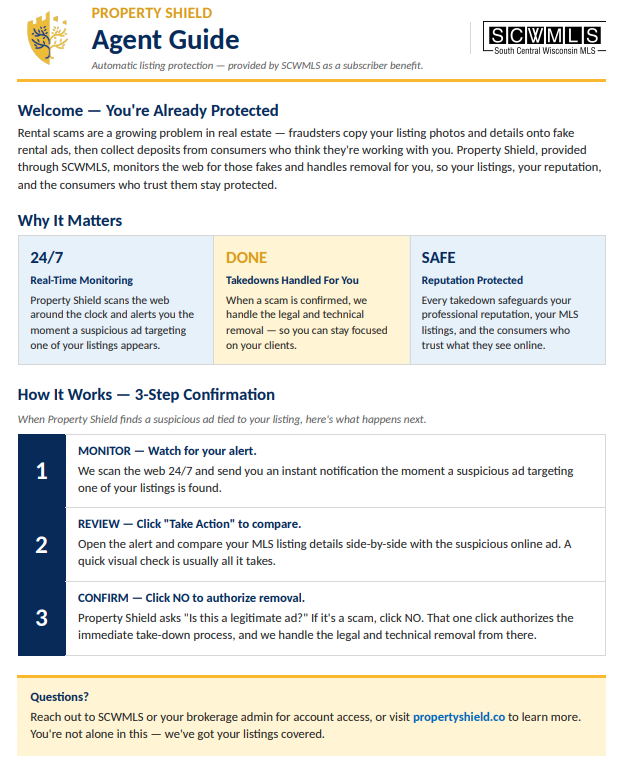
Property Shield is an AI-powered monitoring and protection platform designed to help identify potential listing fraud, unauthorized use of listing data, brand impersonation, and other online threats. By proactively monitoring activity across the internet, this service gives SCWMLS and our subscribers another layer of protection in an increasingly complex digital environment.
What happens if you receive an alert?
We have included a short educational video to walk you through what to do if you receive a Property Shield email alert. The video will explain how to review the alert, understand the issue identified, and take the appropriate next steps.
Please take a few minutes to watch the video so you’re prepared when an alert comes your way.
Join Us for Live Training
Want to learn more? Property Shield will also host two live training sessions:
This is more than just another member benefit. It’s an investment in protecting our MLS ecosystem, our members, and consumers from the growing threat of online real estate fraud.
We are proud to lead the way as Wisconsin’s first MLS to launch Property Shield—and we’re just getting started.
Property Shield. More protection. More proactive monitoring. More peace of mind.
Aug
13
2026
Email issues with Microsoft domains
We have been notified of reports of email delivery issues related to certain email providers. Users may be experiencing delays or non-delivery of emails to Microsoft domains. All appropriate levels of support are engaged.
We recommend that users utilize an alternative email address while this issue persists.
Updates will be added to this post as we get them.
Aug
11
2026
Coming Soon: Property Shield
Property Shield – a benefit for members of the South Central Wisconsin MLS!
Property Shield is a real estate data security platform that will soon protect our members by monitoring the internet for rental scams, fake property listings, and unauthorized use of listing data.
We will continue to share more information about this new member benefit, including training opportunities, sneak peeks, and everything you need to leverage this new tool.
Protecting customers’ information is a top priority, and as part of their ongoing efforts to strengthen account security, Showingtime is introducing two-factor authentication (2FA) to help prevent unauthorized access to ShowingTime accounts.
Beginning August 18, members who sign in to ShowingTime will be prompted to set up two-factor authentication. You’ll have 30 days from your first prompt to complete setup before it becomes required the next time you sign in.
We encourage you to complete setup when you’re first prompted and to confirm that the email address associated with your ShowingTime account is current and accessible.
Aug
10
2026
🌟 NOMINATIONS ARE OPEN: 2026 Good Neighbor Award
Know a REALTOR® or real estate team making a difference in our community? Nominate them for the 2026 RASCW Good Neighbor Award!
Recipients will receive a monetary donation to the nonprofit of their choice.
🏆 Celebrating Our 2025 Good Neighbor Award Winners
Last year, we were honored to recognize three outstanding REALTORS® who are giving back and making a meaningful difference in their communities:
Andrea Joo — Century 21 Affiliated Supporting Iowa County Pheasants Forever
Anne Baranski — Badger Realty Team Supporting Albert’s Dog Lounge
Monique Olson — Preferred Title Supporting Level Up Foundation
These REALTORS® demonstrate the incredible ways our members give back, support important causes, and strengthen the communities they serve.
Who will be part of the 2026 class? Nominate a deserving REALTOR® or team today!
Aug
4
2026
FOREWARN August Training
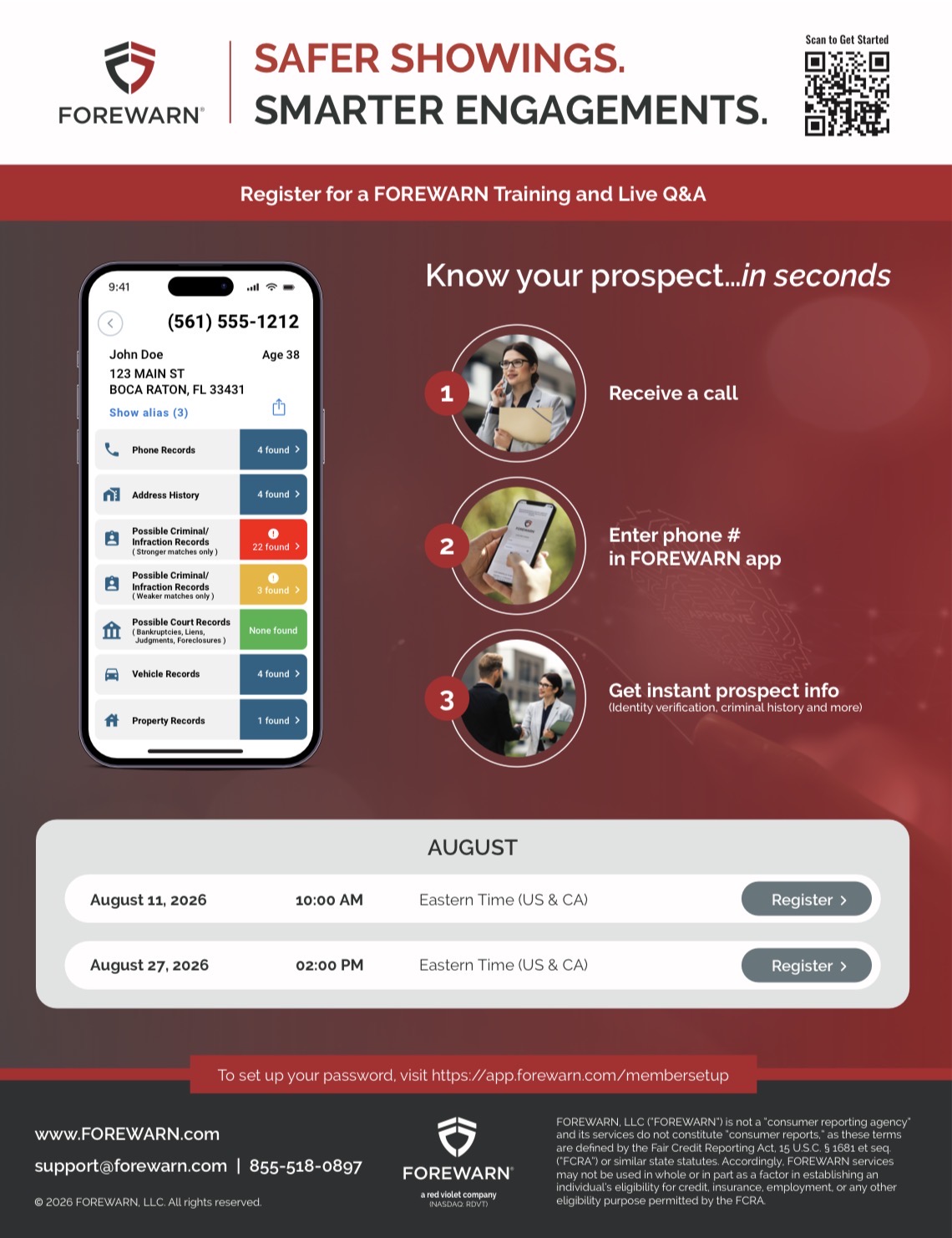
The next FOREWARN trainings are August 11th at 9:00am and August 27th at 1:00pm. Join us as we demonstrate how to best utilize FOREWARN, share insider tips and tricks, and host a live Q&A session.
Not every lead is ready to make a move today … but that doesn’t mean they won’t be ready tomorrow.
In this month’s Domii Sales Series, we’re talking about what happens after you find the lead. Learn how to stay connected, nurture relationships, and consistently work your pipeline so the seeds you plant today can turn into future listings and clients.
We’ll cover simple, actionable strategies to help you:
• Identify opportunities worth nurturing • Stay top-of-mind without feeling pushy • Create a consistent follow-up rhythm • Use Domii tools to uncover insights and strengthen your prospecting • Turn everyday conversations and connections into future business
Finding the lead is just the beginning. The real opportunity is in how you work it.
Join us and learn how to plant more seeds, nurture your pipeline, and build business that keeps growing.
Jul
29
2026
New Collaboration Center Notification Preview
As part of the new updates that were rolled out for Paragon, there has be a change to the notification preview received from the Collaboration Center. This new view no longer contains the property image or address.
This change was made in response to blocking of images, and data being limited by certain email providers. If you click on the notification it will redirect you to the Listing in Paragon.
Jul
28
2026
Property Shield is Now Live!
What Is Property Shield?
Property Shield monitors the internet for potential misuse of listing information and can help identify activity such as:
Rental scams using legitimate listing information
Fake or fraudulent listings
Unauthorized use of listing content
Potential brand impersonation
Other suspicious activity involving your listings
How Does It Work?
Property Shield works behind the scenes to monitor for potential issues. If activity is identified involving one of your listings, SCWMLS will alert you and contact you directly (emails will come from support@wisre.com) to help you understand what was identified and what steps may be available.
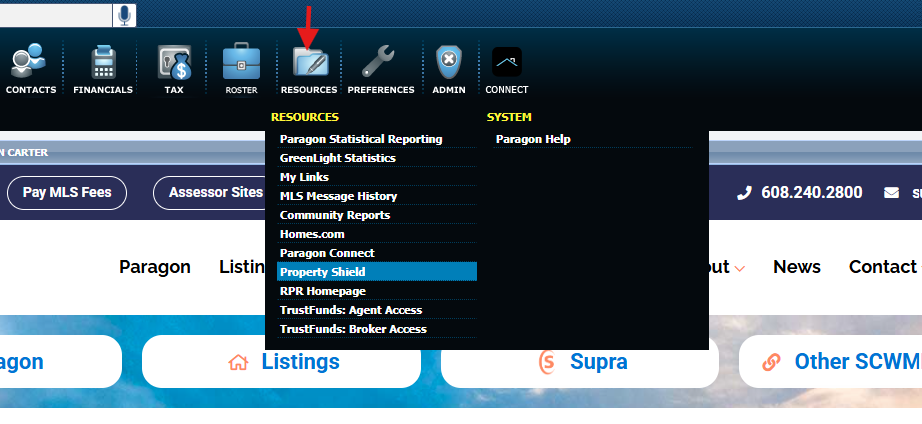
To Access Property Shield SCWMLS members login through Paragon, and Navigate to the Resources tab.
We’re proud to lead the way in Wisconsin and bring our members technology that helps protect what matters most—their business, their listings, and their clients.
Another Way We’re Protecting Your Business
Being the first MLS in Wisconsin to bring this technology to our members is more than a milestone—it demonstrates our commitment to continually looking for new ways to support and protect our REALTOR® members.
Jul
24
2026
Mapping Issues with "Aerial" & "Hybrid" Views
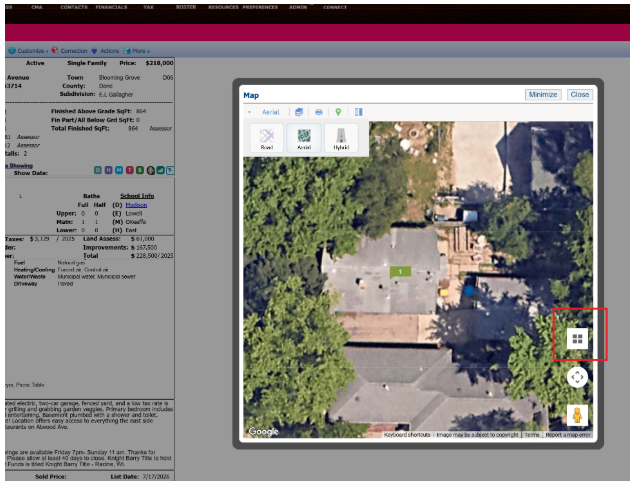
Paragon is currently experiencing issues with Aerial and Hybrid map views not displaying images when zoomed in. This issue is being worked on in the background and will hopefully be resolved soon.
The immediate workaround is to change the Tilt Map. This is done by clicking on the button inside the highlighted red box in the picture below.
Jul
23
2026
Paragon's Yahoo Email Non-Delivery Workaround
UPDATE –
Paragon has fixed the problem that was preventing Yahoo emails from receiving Collaboration Center notifications.
Thank you for your patience during this process.
STATEMENT FROM PARAGON:
“Paragon is still investigating reports of email delivery issues related to Yahoo rate-limiting and blocking emails from Paragon. Users may be experiencing delays or non-delivery of emails to Yahoo domains. All appropriate levels of support are engaed.
We recommend that users utillize an alternative email address while this issue persists.
We will advise you once the issue is resolved. Please communicate this alert internally within your organization.”
Jul
21
2026
SECURITY ALERT: Impersonation Scams
Scammers are increasingly targeting REALTORS® by sending emails using the real names of RASCW/SCWMLS REALTORS® officers and staff. It asks for a link to be clicked, PDF opened or for an “urgent favor” that involves a financial transaction. To protect yourself, beware of email addresses coming from a random Gmail or Outlook account. If in doubt, verify independently by calling us or the sender.
Jul
20
2026
Email delivery issues
We are tracking an issue with Yahoo and some other email providers. Messages from Paragon to some providers are being delayed or blocked. We are working with them on a fix. In the meantime consider switching to an alternate email provider until this is resolved. We will update this post with any new developments.
Jul
20
2026
FOREWARN July training
The next FOREWARN trainings are July 14th at 9:00am and July 30th at 1:00pm. Join us as we demonstrate how to best utilize FOREWARN, share insider tips and tricks, and host a live Q&A session.
We’ve been made aware that Zillow and some other third-party websites may calculate or display Days on Market (DOM) differently than Paragon. Because these are external platforms, the DOM shown on those sites may not always match what members see within Paragon.
This does not necessarily mean the third-party information is incorrect; it may simply reflect a different calculation method, display logic, or data presentation format. Similar to how listing photos may be uploaded in one order but displayed differently on consumer-facing websites, third-party platforms may organize or present listing information in ways designed for their own systems and users.
SCWMLS is working with third-party sites to encourage clear and consistent messaging around DOM and related listing data. However, members should always rely on Paragon, Collaboration Center, and reports generated within the SCWMLS portal for the most accurate and authoritative listing information.
We have also updated the Multiple Listing Options for Sellers form to include disclosure language related to third-party display of listing information.
Per SCWMLS policy:
DOM resets each time a new listing is entered. Since DOM begins counting on the list date, a listing must be entered on that same date in order to reflect a DOM of 0.
CDOM, or Cumulative Days on Market, resets only when the property has been off market for at least 31 days. When counting those days, do not include the off-market date or the new list date. There must be 31 full days in between.
DOM does not accrue while a listing is in Delayed, Withdrawn, or Offer-No Show status.
Members should continue to use Paragon as the source of truth for DOM and CDOM within SCWMLS.
Jul
16
2026
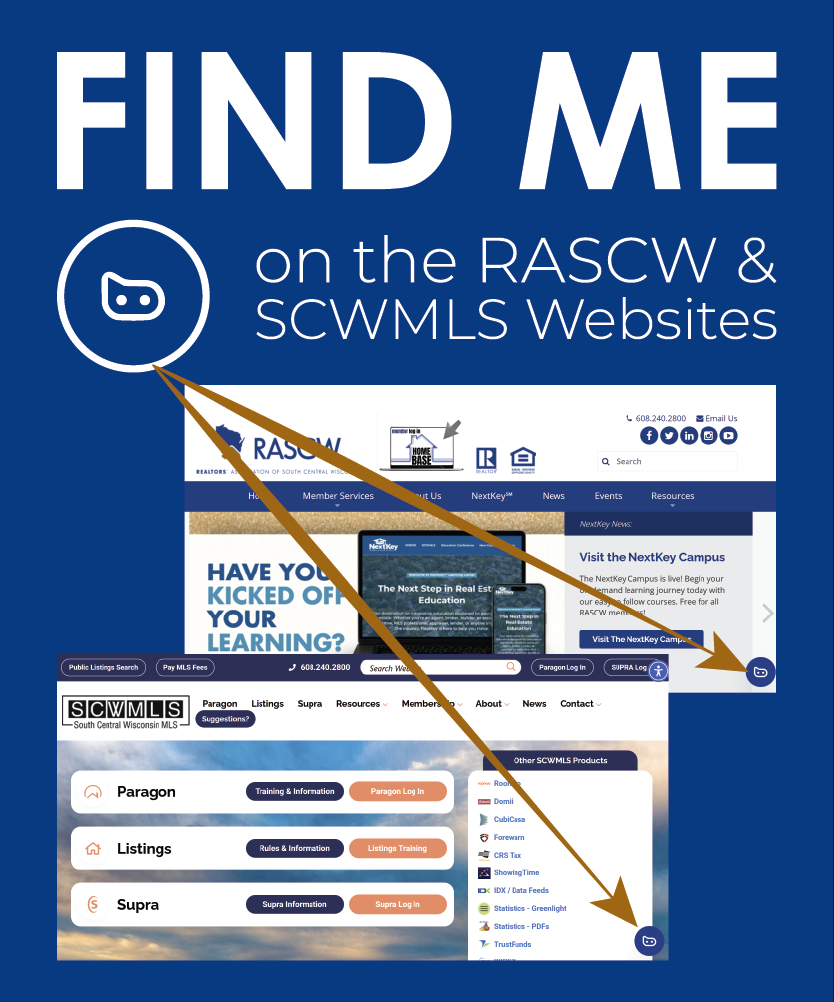
Meet BB: RASCW's BrokerBot
Getting your answers just got easier.
Meet your BrokerBot.
This new tool is located in the bottom right corner of the RASCW & SCWMLS websites as a widget, or by calling the BrokerBot hotline at (608) 927-0800.
This tool provides immediate, 24/7 support to YOU.
A great way to get acquainted is by sending the BrokerBot a quick message, asking it what it can do for you.
It can answer a variety of questions you may have, including (but not limited to):
How can I use the reverse prospecting tool in Paragon?
How can I find the tax roll on a property?
What are the SCWMLS rules relating to digitally altered photos?
Explore, learn, and maximize what you’re getting from YOUR SCWMLS Membership.
Your time is valuable. No more digging.
If you encounter a question that BrokerBot cannot answer, ask to speak to a human and an email escalation will automatically be sent to rascw@wisre.com mentioning your inquiry.
Disclaimer: Like any Generative AI, BrokerBot can make mistakes. BrokerBot cannot access members’ personal and confidential information.
Jul
13
2026
Domii Webinar - July Sales Series Don't Buy Leads—Own Your Neighborhood
Register here: Webinar is Thursday July 16, 2026 at Noon
In today’s market, the agents who know their neighborhoods best win more listings, referrals, and repeat business. Join us to learn how to instantly access homeowner data, demographics, market insights, property information, and prospecting tools that help you position yourself as the local expert. Discover how to research any neighborhood in minutes and turn that knowledge into more conversations and more closings.
Our systems are currently experiencing temporary syncing issues with Paragon. If any information has been requested to be changed but is not being reflected in Paragon this may be why.
If you have paid your dues, please allow 30 mins for this to reflect. If you are still unable to log in after that time please call us at 608-240-2800.