Skip Navigation

News & Past Hot Tips

Nov

1

2018

November 2018

November 2018

-Database/Profile Sheet Changes: On November 19, we made a few changes to our feature pick lists. These changes were done as a result of both member requests, and our work to align our data fields with Metro Milwaukee and Northeast WI MLSs. The majority of the changes were done within the Business/Commercial property type. A full list of changes can be found here. Updated profile sheets can be found here. Profile sheets have also been updated in ZipForms.

-Rule Reminder: Listings no longer available for showings due to an accepted offer must be moved to the status of Offer-No Show (PND). It does not matter if all contingencies are removed; the deciding factor is if showings are allowed or not. Please make this change as soon as possible. MLS rules mandate this change must be done within 3 days of when the property is no longer available for showings.


Oct

1

2018

October 2018

October 2018

-Save Time Adding Listings. If you are not currently using the Tax Autofill link when adding a listing, you may want to check it out. Clicking on the Tax Autofill link at the top of the Add Listing screen will take you to the Tax Search page. Locate the property you are adding by parcel number, address, or owner name. Select the tax record, and then click on the Autofill link at the top of the screen. Information such as address, owner, school district, acres, assessments and taxes will be automatically imported into the add-listing screen saving you keystrokes. If the listing agent has provided information that is different from what is auto-filled, you can simply overwrite the auto-filled information.

-Agents with standard agent level security can modify all fields on their listings except those that are contractual in nature (status, price, Y/N questions, and address). These fields can be modified by someone with a higher security level (ex: office staff or broker).

-What Can I Do If My Listing Shows Up For Rent Online?

  • Contact the website and ask that the ad be removed.
  • Place a sign on the front door clearly stating that the property is NOT for rent and refer any questions to the listing agent.
  • Contact the Consumer Protection Division of the Department of Agriculture, Trade and Consumer Protection at 800-422-7128.
  • Contact the Police Department serving the city your property is listed in.

-The ability to measure distance from one point to another when searching using the map has recently been added. This measurement can be saved along with the map shape(s) as a point of reference. The new measure tool can be found under the Draw option within the map toolbar. Usage tip: After selecting the measure tool, single click on the map anywhere while you have a cross as your cursor — when your cursor turns into a hand, this will select listings, not draw measurement.

-A share to Twitter option has recently been added along with Share to Facebook within Listing Maintenance. Find this new option under Integrations within the Select an Action box while in Maintain Listing. All Active, Pending, and Sold listings for which you are a listing agent can be selected to share via Twitter or Facebook. After clicking on Share to Twitter, you will be given a url to share. Add any message you want and select to Tweet. You will need to have a Collab Center site set up before you can take advantage of this new feature. If you are not currently using Collab Center, you can set up your site under Preferences (in the menu bar at the top of the screen).

-If you change contact information (i.e. email address, phone number, company affiliation), remember to update your Paragon Email Signature (Preferences – Email Signature).

You can store multiple Email Signatures and multiple Message Bodies for inclusion in emails from Paragon. Click Preferences, and Email to access the Email Signature and Message Body folders. Within both of these preferences, you have the ability to set one as your default, and insert any of the others on the fly. When you set up email auto-notification for a contact, you can included any Email Signature and/or Message Body from the list, and that is the signature and/or message body that client will always get. The Message Body will display before the Click Here to View Listings link, and the Email Signature will display after.

Sep

1

2018

September 2018

September 2018

-Do you or a client have a property to rent? Do you have a client that needs a place to rent? Paragon includes a rental add and search program. Residential rentals can be added by clicking on Listings and Rental. To search for rentals click on Search and Rental. All Paragon users have access to add rentals. Access to the add rental module is not restricted in the same fashion as adding a property for sale. Rentals can be added for 6 months at a time. Click here for a copy of the Rental Profile Sheet. All rentals added to Paragon automatically flow to www.apartments.com.

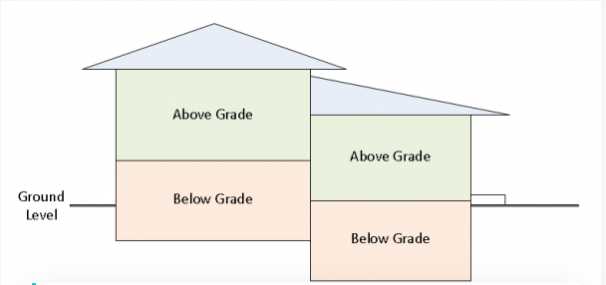
-When filling out the field for Finished Above Grade Square Footage, include only the finished area on levels that are 100% above grade (or ground). None of the square footage on a walk-out lower level with even one wall partially below grade should be included in the Above Grade Square Footage field, even if all the other walls on that level are above the ground. Click here for a must have resource to help you classify square footage correctly.

-Agents with standard agent level security can now update all room dimensions, room levels, and other room names for their listings within Paragon. In addition to these fields, agents have had the ability to update all pick list features, photos, virtual tours, associated documents, map location, public remarks, broker-to-broker remarks, showing instructions, open house date/time, broker open date/time/comments, and assessment/tax info for their listings.

-We are excited to report that the Northeast Wisconsin MLS is now importing SCWMLS listings directly from WIREX into their local MLS database. If you list a property in any of the following counties, that listing will automatically be loaded into the Northeast WI MLS database for easy access by their members. The counties include: Adams, Brown, Calumet, Dodge, Door, Fond du Lac, Green Lake, Kewaunee, Lincoln, Manitowoc, Marathon, Marinette, Marquette, Menominee, Oconto, Outagamie, Portage, Shawano, Sheboygan, Waupaca, Waushara, Winnebago, and Wood.

Since June of last year, we have imported over 5,500 listings from other MLSs, via WIREX, directly into your SCWMLS database to make it easier for you to find them. These listings are located in the 19 counties our SCWMLS members typically list and sell in. Metro MLS has done something similar in that their members can also see SCWMLS listings directly in their Flex system without switching to WIREX.

Aug

1

2018

August 2018

August 2018

-A new listing share option has been added that will allow you to share listings in SMS, MMS, or instant messenger applications. From the spreadsheet, you will see a new option in the toolbar labeled Share. When you select the listings you want to share, and click the Share button, a URL will be displayed in a modal. This URL can be used to send the group of listings via a text message. The link, when clicked on by the receiver, will display listings in the mobile friendly Collab Center listing view.

-A new Southwest theme banner has been added to your preference options to spice things up! Go to Preferences -> System -> User Interface.

-A feature called map boundary has recently been added within Paragon. In the past, when a user entered search criteria first, and then clicked to open the map search, they were confused because the map did not display the matches for the criteria they had already entered. Now, the map will open with the matches from the criteria you have entered before selecting the map search criteria. The map will automatically open using the best-fit zoom level. There is an icon within the tool bar at the top of the map to turn this boundary off if you would rather your matches not display until after you select your map shape(s). This icon is a green dotted line square with a magnifying glass located to the left of the address search bar.

-If you are providing a Real Estate Condition Report to a buyer, it must be on the most recent version of that form (6 pages versus 2-3 pages). Even if the seller completed the form before 7/1/18, you will need an updated one if that form is provided to a prospective buyer after 7/1/18.

-When entering a new listing, you are asked to indicate, via free form fields, items that are included and excluded in the sale. In addition, there is the opportunity to select some items that are included under feature pick lists (i.e. Washer & Dryer under Interior Features). We encourage you, as a listing agent, to enter the included items in both the free form field and in the pick lists. As a selling agent, please check both places just in case the listing agent has not read this helpful Hot Tip.

Jul

1

2018

July 2018

July 2018

-The Show Date field is now available for optional entry on active listings. Show Date has been a required field for delayed listings, but was not available for active listings. If a listing is not ready for showings, an agent has the option to put that listing into delayed or active status. If set to active, MLS rules require the listing to include the date showings will begin in the first line of the MLS public remarks. This is still mandatory, as the date showings will be allowed must be made clear on public websites. You can find the Show Date field under the Showing Info section when adding/maintaining a listing. Showing dates are automatically blocked off within ShowingTime until the Show Date.

Important Reminder: If you enter a Show Date for either a delayed or active listing, and have to change that date (either forward or backward), remember to contact agents who have set up a showing based on the original show date, to reschedule based on your new show date. ShowingTime does not do this automatically for you.

-ShowingTime reports that the national average for showing feedback is 72%. SCWMLS members are a bit above average, completing feedback requests 76% of the time

-Within Paragon, you can change the fields that display on the spreadsheet list of properties that come up after a search. Click Customize from the closest toolbar above, and select Fields. The box on the right lists the fields that currently display on your spreadsheet. If you want to remove a field, simply click on the field and click Remove. If you want to add a field from the left box, click on the field and then on Add. If you do not see the field you would like to add, click on the Group box at the top to display different types of fields (i.e. Feature Categories). You can also use the Move Up and Move Down buttons to change the order the fields appear on your spreadsheet. Click on Save and Close to apply your changes. Your customized spreadsheet will now come up each time you display the spreadsheet. There is a Revert to Default button on the bottom if you mess up.

-RatePlug is a valuable tool that lets you share home payment affordability factors directly within any property listing you send your clients, which can get your buyers asking questions about financing earlier, to avoid snags later.

  • Displays only your trusted lending sources
  • Displays calculations based specifically on the listing being viewed
  • Delivers interactive, real-time mortgage programs, payments and qualifying information to your clients
  • Identifies special financing options available (FHA, VA, USDA, etc.)
  • Includes Property Flyer Program for your listings

Click here to learn more, or to sign up for this tool that is included FREE for MLS members.

3 Common Questions Regarding Delayed Listings:

-My seller is still not ready for showings on day 45…what do I do? A listing can only be in the status of Delayed, or as Active with No Showings for 45 days. If a seller is still not ready to show their property on day 46, an extension can be granted. Simply have the seller provide a request for an extension including the reason why. This can be as simple as an email from the seller saying…I am not ready because the painters have been delayed. Forward this request to the MLS at listings@wisre.com for an extension up to another 45 days. If the MLS does not receive a seller request for an extension, MLS staff will send an email to the listing agent on day 46 as a reminder, and will then move the listing to MLS Suspended.

-Why are some no showings until listings in an Active status instead of Delayed? We are generally seeing two reasons a new listing is not available for showings right away. The first is the property is not ready to be marketed due to needed clean up, timing for professional photos, desired staging, etc. You will find these listings in the Delayed status as the listing agent does not want them to be viewed by the public yet. In the second situation, the property is all ready for public viewing, but the seller and listing agent decide to pick a launch date, often starting with an open house. You will find these listings in Active as the seller and agent want the public to see them. The listings in Active must include the date showings will be allowed in the first line of the public remarks. Our rules regarding “no showings until’ listings have taken both situations into account, and allow agents the flexibility to market these listings as either Delayed or Active.

-I listed a property on Monday, and entered it as Delayed on Friday, why is Days on Market showing as 4 days? For all listings, days on market starts counting at List Date and subtracts days in an off-market status. As this listing was entered 4 days after the list date, the time between the list date and the day entered was counted. If you want to avoid a days on market calculation for your Delayed listings, you should enter them on the list date. For days on market calculations, the list date is day 0 and the day after the list date is day 1.

Jun

1

2018

June 2018

June 2018

-ADDENDUM 11A to the WB-11 Residential Offer to Purchase: When drafting an offer to purchase on a property that is part of a condominium with a recorded Condominium Declaration and Plat, it is appropriate to use the WB-14 Residential Condominium Offer to Purchase. In some cases, however, a single-family residential property is not subject to a Condominium Declaration and Plat, yet has non-exclusive use and enjoyment of common areas and amenities – such as properties located in Planned Developments, Residential Cooperatives and where the property owners can share in the use and direct or indirect ownership of shared facilities (for example, playgrounds, clubhouses, and beaches). One popular example of this type of property is Tamarack Trails in Madison, WI. To assist with transactions involving this type of property, the SCWMLS Committee and Board of Directors engaged the services of Attorney Pharis Horton to develop Addendum 11A. This is a voluntary form and is designed to be used with the WB-11 Residential Offer to Purchase. The form can be found here.

-Photo Increase to 36 and New Photo Requirement for Lower Level Bedrooms – At their last meetings, the MLS Committee and MLS Board of Directors voted to increase the maximum number of photos allowed per listing from 25 to 36. This program change has been made. In addition, they voted to mandate a photo showing the egress window for every lower level bedroom. This new rule will take effect for all new listings with a list date of 6/1/18 and later.

May

1

2018

May 2018

May 2018

-When searching MLS remarks, you no longer need to include asterisks (* *) around the word or words you are searching for. What….you didn’t know MLS Remarks were searchable? Well….they are! You will find the Remarks search prompt under the Advanced Criteria section of the search parameters. Simply type in the word or words you are looking for. If your buyer would like a property that has a large garden space, type large garden and your search results will include properties for which the listing agent has included the words large garden in the remarks. You can also string together multiple words. For example, if your buyer would like a home on a secluded lot, you could type secluded (tab) private (tab) isolated. Your search will bring back properties for which the listing agent has included any of these words in the remarks. Give it a try the next time you are looking for something there is not a specific search feature for. Also, when composing your remarks, make sure to mention special features not covered elsewhere in the listing features.

-The MLS does not define what is a bedroom. Listing agents should use common sense when calling a room a bedroom. If you are counting a room as a bedroom that is not a typical bedroom (i.e. does not have a closet, is accessible only by going through another room, etc.), please indicate in the remarks what makes it atypical so that showing agents and potential buyers are informed before a showing. A lower level room that does not meet safety guidelines for a bedroom, however, should not be labeled as a bedroom in the MLS. Click here for requirements from the Department of Safety and Professional Standards regarding lower level bedrooms.

Apr

1

2018

April 2018

April 2018

-Double Exposure for Delayed Listings: Within the Market Monitor on the Paragon home page, the link to New listings includes each new listing created within the number of days you have requested. When a new listing is added as Delayed, it shows up under this New link. We have made a change to also include listings that move from Delayed to Active within the New link. So if you add a listing as Delayed, it shows up once when first added, and then again when it moves from Delayed to Active.

-When viewing a listing in Paragon, one of the links at the top is “correction”. If you click on this link, an email box will open. Use this link to report to the MLS what you believe to be a data inaccuracy on the listing, or a violation of our MLS rules as related to the listing. Since last summer, we have imported over 3,600 listings from other MLSs directly into our Paragon system. The MLS number for these listings begin with a two-characteralpha designation (ie MM for Metro MLS). As rules vary from MLS to MLS, what may appear to be a violation in our MLS, may not be in the source MLS. Therefore, if you report an issue via the correction button for one of these listing, we will pass the report on to the source MLS, but may not be able to “fix it”. Reporters of violations via the correction button are kept anonymous.

-If you click the listing agent name on reports, a box will open showing alternate agent phone numbers and a photo of the agent, if the agent has loaded a photo into Paragon. Agents can load a photo of themselves by clicking on Preferences, User, Agent Image. Agents can also load a logo here.

-We were recently notified by Supra that if you are using the eKEY Supra App on an iPhone with an older operating system, you may have issues entering the last digit of your PIN when trying to obtain the key from a Keybox. Please make sure your phone is updated to the latest iOS (operating system 10.3.3 or higher) to avoid any inconvenience. If you have any questions, please call Supra Technical Support at 877-699-6787.

-The Board of Directors recently fined both an agent and her broker $2,000 each for showing a property to a potential buyer the morning before it was available for all to see later in the day. No showings means no showings…..right up until the minute it is available for all to see. Both the listing side and the showing side can be sanctioned for allowing and taking part in a showing before it is available for all to see. In addition, it is against MLS rules for agents from companies other than the listing company to preview properties not available for showings.

-Arms Length Added to Sale Factor Pick List: To provide a more accurate representation, we have replaced the option of N/A with Arms Length within the list of Sale Factors when moving a listing to SOLD. N/A was included to indicate no special sale factors, which is the same as Arms Length. Arms Length should be selected for all sales that are NOT between friends or family members, between employer and employee, between a parent company and its subsidiaries, or between a trust and its beneficiaries. Most sales are Arms Length.

Mar

1

2018

March 2018

March 2018

-Bing maps have been replaced with Google maps throughout Paragon. The main reason for this change is to offer more up-to-date maps. At this time, our Paragon vendor is still looking for a Google tool that measures the distance while drawing a shape. A workaround for a radius is to first enter the address at the top of the screen and select the number of miles. If you have not tried the Hybrid option for map view, give it a try. It is similar to the old Birdseye and provides street detail. If you like this view you can set it as your default. Go to Preferences – System – Search Options – DefaultMap View.

– Our Supra key system allows you to set email or text alerts when an agent opens your keybox, and when they leave your listing. You can also set up to send this alert to your seller or team member(s). Alerts can be set up via www.supraekey.com (click the SupraWEB Login for Real Estate Agents). If you are new to this website, you will be prompted to set up an account (hint: your key serial number displays at the top of your ekey screen). Click here for detailed instructions on setting up showing alerts.

-The list price for commercial properties that are for lease only have been entered in our MLS inconsistently. To fix this, we ask that you enter the list price for commerical lease only listings as the annual lease amount. We have added a note to the agent full report that says “if lease only = annual lease amount” to help clarify.

-Listings in the status of Delayed or Active marked as “no showings until” cannot be shown to prospective buyers by a cooperating agent or by the listing agent. In addition, agents from companies other than the listing company are not allowed to preview these listings. Those found in violation of this rule can be fined up to $15,000 and are subject to suspension of MLS services. This fine and suspension can be applied to both the listing agent and the agent showing the property.

Feb

1

2018

February 2018

February 2018

-Since June 1, we have imported over 3,000 listings from WIREX directly into your SCWMLS database to make it easier for you to find them. These listings are located in the 19 counties our SCWMLS members typically list and sell in. These listings, listed by members of other MLSs, were in the past only available via a separate WIREX search. Metro MLS has done something similar in that their members can also see SCWMLS listings directly in their Flex system without switching to WIREX. Members of both MLSs can now easily find all listings in one single search, see listing detail on these listings, and schedule a showing directly by clicking a button from the listing detail. SCWMLS and Metro MLS continue to work together to keep our database fields aligned, which allows a seamless search experience for their members.

– From your ShowingCart screen, click on the email icon in the top right corner and then type your client’s email address in the To field. Your clients will be emailed a buyer’s version of the showing tour, which they can open on a mobile phone to take advantage of the built-in navigation option.

-The default spreadsheet sort in Paragon is by Price. You probably know you can click on the header of any column to resort the spreadsheet by that column. You can also set a multiple sort for the spreadsheet. When on the spreadsheet view, click Customize from the closest toolbar above, and select Sort. You can select up to 3 levels to sort your spreadsheet by. You can also select Ascending or Descending. This sort order will now be your default sort each time you display the spreadsheet.

-Avoid a $100/day fine: All MLS eligible properties must be entered into the MLS within 4 calendar days of the effective date (first day of the term) of the listing contract. If a seller instructs you to withhold their new listing from MLS for a limited time, that listing must still be entered into the MLS within 4 calendar days of the effective date, but should be entered with a status of Delayed. It is against MLS rules to include verbiage such as “not to be entered into MLS until X” as a means to avoid entering a listing within the required 4 days. If a seller does not want their new listing marketed via the MLS at all, this instruction must be written into the contract for the whole term of the contract. Once your seller has signed a listing contract, that listing begins on the effective date (beginning of the term). You cannot modify the effective date via an amendment once that date has passed. In other words, you cannot undo days a listing was already under contract.

-Clicking the My Info Tab on the Market Monitor (top right on this page), gives you quick access to your current active listings as well as your current offer-no show listings, your current delayed listings, your listings due to expire for days specified, and your solds for the past 6 months. Listings under the Sold Within Six Months link include your co-broke sales, allowing easy monitoring to be sure you are given credit for co-broke solds.

-Updated Resource: Click here for updated 2017 Tax/Mill Rates.

Jan

1

2018

January 2018

January 2018

-Q: My buyer wants a home with at least 2 bedrooms and one extra room. What is the best way to search for this in Paragon?

A: Within the Feature pick list under search Secondary Criteria there is a feature for Z-Other Rooms. Within this pick list select Bedroom, Bonus Room, Den/Office, Sun Room, etc. within the Must Have 1 or More column. Paragon will look for listings that have at least one of these rooms listed as Other Room 1-4.

-The 4-day grace period allowed to gather information before entering a new listing on the MLS, is not a barrier to showings by a potential subagent or buyer’s agent. All MLS eligible properties must be made available for showings on the effective date of the contract, unless the seller has indicated that no showings are allowed for a specific time. Any no showing stipulation would apply to showings for all perspective buyers, including those working with the listing agent.

-Click here for a copy of the 2018 Gregorian Calendar.

-If you receive an email alerting you that a client has opted out of receiving emails from you via Paragon, this may be because they accidently clicked on the opt out link within an email, or because Paragon received a bounce back from your clients email provider. To opt them back in, email them the following link or open the link and type in their email address: https://scwmls.paragonrels.com/CCR/paragonsubscriptions?action=optin. Your client will be sent a confirmation email containing an opt-in option they will need to click on within 72 hours to opt back in. This opt in link can also be found within the links in the orange banner on the top of the Paragon home page. You can proactively check for clients that have been opted out by clicking on Contacts and View/Manage Contacts within Paragon. Look at the Email column. Clients should have an orange envelope indicating a valid email address. If you see a white envelope with a red exclamation point, this client is opted out and is not receiving emails.

Dec

1

2017

December 2017

December 2017

-Newly created Wis. Stat. 452.136 (3) states that an agent cannot advertise a property unless a listing agreement has been executed. It is no longer permissible to advertise a listing as “coming soon” without the existence of a listing agreement.

-Share to Facebook Added: With the update last week, a Share to Facebook option was added within Listing Maintenance. Find this new option under Integrations within the Select an Action box while in Maintain Listing. All Active, Pending, and Sold listings for which you are a listing agent can be selected to appear within your Facebook feed. The post includes the primary photo, public remarks, and a link to the detail report within Collab Center. You will need to have a Collab Center site set up before you can take advantage of this new feature. If you are not currently using Collab Center, you can set up your site under Preferences (in the menu bar at the top of the screen).

-Agent Phone Labels Added: When clicking on an agents name within Paragon, up to five phone numbers will display. These phone numbers are now labeled (Pref, Offic, Home, Cell, Fax). Pref = Preferred number. Offic = the phone number in the office record which cannot be changed in the agent record. Please email member@wisre.com if you want to make any changes to your phone numbers.

-New MLS Offering – Homesnap Pro: SCWMLS members now have the option to utilize Homesnap Pro as an added MLS benefit. There is no charge for this cool new product. Installation instructions: Apple iPhone/iPad or Android. Click here for tutorial videos.

-Don’t be a Keybox Jammer: When placing keys in the new Supra keyboxes, please make sure to put them in the front compartment, where a green sticker with bright yellow keys displays. Do not put them in the back more open area which has a picture of a key with a line through it. If a key is placed in the back, it is likely to jam. For those more visual, click here.

Nov

1

2017

November 2017

November 2017

-Wisconsinhomes.com Framed Website – If you currently use the free framed version of wisconsinhomes.com (www.wisconsinhomes.com/index2.php) as the listing search portion of your website, please let this serve as notice that we will be eliminating this framed option the end of December. We will be transitioning wisconsinhomes.com to a new vendor, which will not allow for a framed option. We are currently working with the IDX vendor, Placester, to offer an alternative. If you are interested in this alternative, please email support@wisre.com for more information.

-Property PIN: With the October database changes, we added a new optional listing field called Property PIN. This field can be used within your office to tie listings to internal processes (i.e. advertising PIN). This field is not on any standard reports, but can be added to spreadsheets and custom reports, and can be searched on. This field is alpha/numeric and has a max character count of 25. The Property PIN field within maintain listing can be found under the Open House/Tour/PIN section.

-Value Price Range Reminder: The price identified as the contractual list price on the listing documentation is the price that must be listed on Paragon in the list price field. Include the range in the first line of the MLS Public Remarks.

Oct

1

2017

October 2017

October 2017

-In the past, listing edit checks required that you enter the dashes and periods as part of a parcel number when entering a new listing into Paragon. As we now are storing the parcel number with and without the punctuation within the tax module, it is no longer necessary to include the dashes and periods when entering your new listing. Paragon will now accept a parcel number with our without the punctuation. An error will still come up if you enter the wrong number of digits.

-Rule Reminder: A new listing contract must be obtained before re-entering an existing listing into the MLS as new. If the MLS discovers a new listing contract was not obtained, the new listing will be deleted and the listing broker will be fined $50. It is not acceptable to draft only an amendment to create a new MLS listing.

-Condo Pets & Parking: If you currently have an active Condo listing, please check to be sure pets and parking are reflected correctly. We have expanded the options for pets, and in doing so converted Small Pets Only to Cats OK and Large Dogs OK to Dogs OK. If your condo allows small dogs, please select the new features Dogs OK and Size Limit. If you had selected 1 Space, 2 Spaces or Outside for condo parking, please note that we have changed these features to 1 Space Assigned, 2+ Spaces Assigned, and Outside Only. Please edit condo parking if these features no longer apply.

-Database Changes: On October 9th, we made several changes to our database. The changes were a result of both member requests and our work to align our data fields with Metro Milwaukee and Northeast WI MLSs. These changes include the elimination of value range symbols, the combination of below/part below grade and non-exposed sqft fields, an increase in the size of the broker-to-broker remarks field, and various pick list feature additions/deletions. A full list of changes can be found here. Updated profile sheets can be found here. Profile sheets have been updated within ZipForms.

Sep

1

2017

September 2017

September 2017

-We are currently preparing for a few data additions/changes scheduled for mid-October. One of the changes that will be made is the elimination of the +, -, = symbols for value range. These symbols have been routinely misused, and have not been handled correctly via data exports, which in turn has resulted in misinformation on public websites. In addition, our MLS partners throughout the state have eliminated value range symbols. To follow the national norm and improve the accuracy of your data, we will require the actual list price of the property be entered within the list price field. If you are marketing via a value range, you will continue to list that range within the MLS public remarks.

-Metro Milwaukee MLS is now including listings from our MLS within their native database. This means that Metro Milwaukee members are no longer required to search within WIREX to find listings entered into the South Central Wisconsin MLS Paragon system. In the past, if you wanted to market a listing to members of the Metro Milwaukee MLS, and wanted to ensure they found it in their native MLS system, you were required to join their MLS. Now, when you enter a listing into the South Central WI MLS Paragon system, it will flow to the native Metro Milwaukee MLS system.

-Agents with standard agent level security can now update broker-to-broker remarks and all pick list features on their listings within Paragon. In addition to these fields, agents can maintain photos, virtual tours, associated documents, map location, public remarks, showing instructions, open house date/time, broker open date/time/comments, and assessment/tax info for all their listings.

-Clicking on the listing company name link from the agent full report will bring up information about the firm including the company’s license number (under Extended Fields). Please try this with one of your listings to make sure we have your company’s license number on file. If this is blank, or incorrect, please email your office license number to member@wisre.com.

Aug

1

2017

August 2017

August 2017

-The ability to assign and unassign keyboxes to listings has recently been added to Paragon. Within Listings – Add/Maintain, you will now see a link titled Supra Lockbox. Click the Assign link in the upper left corner and enter the keybox serial number and shackle code. The listing agent must have an eKEY assigned in order to take advantage of this option. Other thanbeing a good way to keep track of where keyboxes are, once you assign a keybox to a listing, you will see the MLS number and address on Supra reports instead of the keybox serial number. In addition, if you set up notifications to alert you of beginning and ending showings, the alerts sent will better identify which listing is being shown.

-Have you ever run into a situation where you don’t have the shackle code when you go to remove a box? If you store your keyboxes under Inventory in your eKEY app, that information will be at your fingertips. When you open the shackle to place a keybox on a listing, a default question appears asking if you want to Add to Inventory? If you leave this checked, the box will automatically be added to your Inventory. You can also manually add keyboxes to your Inventory (you will need the shackle code). Besides the shackle code, the details under Inventory will tell you the battery life and allow you to link the MLS number. You can also add notes and your business card for the showing agent.

-Thinking about using a drone to take photos of your listing? Aerial photos are cool, but capturing them via a drone requires a license. Please review the NAR Field Guide to Drones and Real Estate for more information.

-Are You Missing Listings? If you have a buyer requesting to be in a specific school district, do not simply search by the municipality you think is serviced by that school district, but rather use the School District search field. There are many instances where school districts span several municipalities, and it is easy to miss listings if you are not aware of all of them. For example, the school district of McFarland spans six different municipalities. If you limit your search to the Village of McFarland, you would miss over 37% of properties serviced by the McFarland School District.

-Significant Change to E-mail Message Body: If you have created a Message Body (different than your E-mail Signature) for your emails sent out of Paragon, please note that on August 23, HTML formatting will be removed within the Message Body function. If you have created a “fancy” message body utilizing HTML formatting (including images, links, varied fonts, colored type, symbols), it will be changed to plain text. The formatting for E-mail Signature(s) within Paragon will not be changed, and thus you could copy your HTML formatted message body to your E-mail Signature. This change is being done to prepare for future enhancements to Collab Center Notifications.

Jul

1

2017

July 2017

July 2017

-Since June 1, we have imported over 800 listings from WIREX directly into your SCWMLS database to make it easier for you to find them. Click here for more information on these listings.

-If a showing is requested or confirmed via Showing Time after 9:00 pm, calls, texts and push notifications will be held until 8:00 the next morning. Email notifications will go out immediately.

-The MLS Remarks section of a listing is searchable. You will find the Remarks search prompt under the Advanced Criteria section of the search parameters. When typing in a word or phrase to search for, put asterisks (* *) around the word or phrase. For example, if your buyer would like a property that is on a trout stream, type *trout* and your search results will include properties for which the listing agent has included the word trout in the remarks. You can also string together multiple words or phrases. For example, if your buyer would like a home on a secluded lot, you could type *secluded*, *private*, *isolated*. Your search will bring back properties for which the listing agent has included any of these words in the remarks. Give it a try the next time you are looking for something there is not a specific search feature for. Also, when composing your remarks, make sure to mention special features not covered elsewhere in the listing features.

-Delayed Listings – A listing can only be in the status of Delayed for 45 days. What happens on the 46th day? On day 46, a listing in Delayed will be moved to MLS Suspended. The listing agent will need to contact the MLS office to move the listing out of MLS Suspended. Depending on the circumstances, updated paperwork from the seller may be required to move the listing to Active. The 45 day rule took effect for all new listings with an effective/list date after June 30, 2017. You will see a few listings with a list date before 7/1 that have a show date more than 45 days in the future. These have been grandfathered in.

– 2 MLS Rule Changes:

Change #1 – The Board of Directors recently voted to reduce the grace period for the entry of new listings from 7 calendar days to 4 calendar days from the effective date/list date of the contract. Why? Here are the factors that were considered:

  • Many reported instances of agents posting a new listing, complete with photos, on public websites (e.g. Zillow, Facebook) days before the listing is loaded into MLS. The listings in these instances are ready for public viewing, but the listing agent waits until the last day possible to load them in MLS. Buyers seeing these listings on the public websites do not understand why their agents cannot find them on the MLS.
  • 86% of new listings are already being loaded in the MLS within 4 days.
  • Other MLSs in the state have shorter time periods (i.e. Metro Milwaukee allows 48 hours). Over the past few years we have been working to normalize data and rules between MLSs in the state.
  • Now that we have the status of Delayed, agents have a place to put listings if they don’t have everything ready to go by day 4.

Change #2 – The Board also voted to set a maximum of 45 days that a listing can be set as the status of Delayed. Why? The MLS is an offer of cooperation. If a listing will not be ready for a cooperating agent to sell within a reasonable number of days, it is not appropriate for that listing to be included on the MLS. Agents and buyers are very frustrated when they see a property they are interested in on the MLS, but they cannot see it in a reasonable timeframe.

Both of these changes will take effect for listings with an effective/list date after June 30.

Jun

1

2017

June 2017

June 2017

-Search Made Easier: We are now pulling non-SCWMLS listings, with a list date of 6/1/17+, that are located in the geographic area SCWMLS members typically market in* from WIREX directly into the SCWMLS database. This means that when you do a search within the SCWMLS system for listings in any of these counties, all listings (listed after 5/31/17) will come up even if some of them were input into a different MLS. You will no longer need to switch to WIREX to find these listings. WIREX will still be helpful if you are searching outside this area. The MLS numbers for these non-native listings will be the number that was assigned when it was input into its native MLS, but will be prefixed by 2 letters to make the number unique, and to identify them as being listings that originated in a different MLS system. For example, listings from Metro Milwaukee MLS will be prefixed with MM. You will need to include the alpha prefix as part of the MLS number when searching by MLS number. The native MLS will also be listed within the disclaimer at the bottom of the agent full report.

If your office currently enters the same listings into SCWMLS and another MLS that participates in WIREX, beginning with properties listed 6/1/2017+, we would like you to only enter them into the other MLS and let them flow to Paragon. Besides the time saved in entering the listing, other advantages are the same MLS number will be used in both systems, and all subsequent changes will also automatically be made. If you choose to continue to enter the same listing into SCWMLS and another MLS, we will delete the non-SCWMLS listing once it hits Paragon as we do not want duplicate listings within Paragon.

*Adams, Columbia, Crawford, Dane, Dodge, Grant, Green, Green Lake, Iowa, Jefferson, Juneau, Lafayette, Marquette, Monroe, Richland, Rock, Sauk, Vernon, and Waushara counties. We plan to add listings within Fond du Lac, Jackson, Walworth and Wood counties before the end of the year.

May

1

2017

May 2017

May 2017

-The Board of Directors recently voted to reduce the grace period for the entry of new listings from 7 calendar days to 4 calendar days from the effective date/list date of the contract. This change will take effect for all new listings entered after June 30.

-The grace period allowed to gather information before entering a new listing on the MLS, is not a barrier to showings by a potential subagent or buyer’s agent. All MLS eligible properties must be made available for showings on the date of listing, unless the seller has indicated that no showings are allowed for a specific time. Any no showing stipulation would apply to showings for all perspective buyers, including those working with the listing agent.

-Listings in the status of Delayed or Active marked as no showings until cannot be shown to prospective buyers by a cooperating agent or by the listing agent. In addition, agents from companies other than the listing company are not allowed to preview these listings. Those found in violation of this rule can be fined up to $15,000 and are subject to suspension of MLS services. This fine and suspension can be applied to both the listing agent and the agent showing the property.

-A WRA Legal Hot Tip from May 1 addresses the growing practice of setting a specific date for the presentation of offers. Within this hot tip it states, “there is a serious risk that while a strategy to indicate an offer presentation deadline, or an offer submission deadline, may ratchet up interest among buyers and get them to act quickly, it may inflict harm in the marketplace”. For the complete Hot Tip, click here.

-Don’t forget about your eKEY app when you upgrade your phone. When upgrading, you will need to reinstall the eKEY app and reauthorize via a new 30-digit code. Authorization codes are available from the following sources:

  • MLS staff (608-240-2800 option #2)
  • Supra Technical Support (877-699-6787)
  • SupraWEB

To make it easier to get technical help from Supra, have your eKEY serial number handy. We suggest you save the Supra Tech Support phone number (877-699-6787) as a contact in your phone, and add your serial number as a note in the contact file. You can find your serial number at the top of your eKEY screen (eKEY Basic-1234567).

-If your listing is in the status of Offer-Show, you must allow showings. Please keep in mind that the status of Offer-Show displays on public websites as well as in the MLS. When a consumer sees the label Offer-Show, they are expecting to be able to see that property. It reflects badly on your profession as a whole when the consumer is denied a showing on a property that is clearly marked as Offer-Show. If you are no longer showing a property that has an offer, please move it to Offer-No Show immediately.

Apr

1

2017

April 2017

April 2017

-By default, there is a calendar in the lower right corner of the Paragon home page. Those with broker/manager/administrative access can post events for display on their agents’ calendars. Click the green plus sign to add an event. Enter the event title, location and select Personal, Office or Firm. Selecting Office will display the event to just those in your branch office. Selecting Firm will display the event to all agents in your company. Those with agent level access can post personal reminders. If you utilize the Tasks feature within the Paragon Contact Manager (located under More Information within the contact), these tasks will display on your Paragon calendar as personal reminders.

-If you work within a team and would like your team name to be included on the bottom of the customer full reports, email support@wisre.com with your team name. After we add your team name to your member record, you can customize the customer reports by clicking on Preferences, Views/Reports, and the Details tab. Open up the report you would like to change and scroll down to the bottom section in white. Double click on the white box to display the fields you can include. Select My Info – Team Name, which is located a little more than half way down. Highlight this field and click Add. Place a check mark next to the Team Name and next to No Label at the bottom and hit Save & Close. At this point, the Residential report is done. You will need to do this for each class of property. Your personal slogan can also be added in this same fashion.

back to top