To text a single listing from Paragon, pull up the listing detail, hover over the share button and click Text:
Select a Contact – if you don’t have a phone number saved in it you can type it in. Make sure you check the box next to the number, and select a phone type from the dropdown menu. If you don’t have the person in your contacts yet, click Add New Contact, put in their First and Last Name, and the number you want to text to. You can include an optional message if you like, and it will show a preview of what the text will look like.
Then click Send Message.
You can also text a link to multiple properties from the spreadsheet view. Just select the listings on the spreadsheet you want to send and click the Text button. You can select all of the listings by clicking the first box at the top.
Jan
19
2026
Paragon survey popup
As part of an initiative by ICE Mortgage Technologies, the developers of the Paragon platform, users will periodically see a survey pop-up when logging in. This survey will appear once per day and will remain active through January 23.
Responses are collected directly by ICE Mortgage Technologies, and the MLS will not have access to individual answers. The survey can be dismissed by selecting the “X,” but it will continue to reappear every two days until the survey period ends.
While we understand this may be an interruption, your feedback plays an important role in helping shape future enhancements to the Paragon system.
Jan
9
2026
Forewarn - Training and Q&A
Hopefully you already know about FOREWARN, an easy to use app that allows you to assess risk by learning about a new prospect prior to meeting them for a showing. FOREWARN is offering free training webinars every month.
The next FOREWARN trainings are January 13 at 9 a.m. and January 29 at 1 p.m. Join us as we demonstrate how to best utilize FOREWARN, share insider tips and tricks, and host a live Q&A session.
We are currently experiencing syncing issues with Paragon, which is affecting updates to agents information. Our team is actively working with the system provider to resolve this issue as quickly as possible. Thank you for your patience and understanding.
Jan
7
2026
Resetting Cumulative Days on Market (CDOM)
If you are relisting a property and want CDOM to show zero: The cumulative days on market (CDOM) count will reset if a listing has been off the market for at least 31 days. When counting, don’t include the off-market date or the new list date – there should be 31 days in between. Days on market do not accumulate while a listing is delayed, withdrawn or offer-no show status.
Dec
31
2025
Holiday hours at the MLS
The RASCW/MLS office will close today at 1:00pm, and will be closed tomorrow for New Year’s Day. Have a safe holiday!
Dec
19
2025
WIREX photo issue
We are currently monitoring an issue causing photos to be missing from listings coming in to WIREX from the MetroMLS. This also affects Metro listings imported into South Central. We are working with Paragon to get this resolved as soon as possible.
Dec
19
2025
Partial listing conversion issue
We have had reports of problems when converting Partial listings to live MLS listings. When converting it gives an error message and the photos do not appear on the new MLS listing. The issue is being investigated and we will post any updates here.
Dec
19
2025
Competing Offer Y/N
When changing a listing to an offer status – AC (offer-show), AB (offer-bump) or PND (offer-NO show) – you are asked if there were competing offers. Answer “Yes” only if there was more than one written offer presented at the same time (including the accepted offer). NOTE: This field is optional at the time you change a listing to AC, AB or PND, but required once you change a listing to SOLD.
Dec
19
2025
Security Alert: Reported Scam Targeting Realtors
We want to make members aware of a potential scam that has now been reported by multiple members.
Members have received unsolicited text messages from individuals claiming to be relocating from out of state and requesting a Zoom meeting. When members asked for meeting details, they were sent links that required downloading software or files.
At this time, the exact intent of the scam is unclear. It may involve malware, attempts to access personal or business information, or broader real estate fraud.
In one reported case, a seller has placed a fraud alert on their property with the Register of Deeds as a precaution.
Please remember:
Do not download files or software from unknown contacts
Be cautious of unsolicited relocation inquiries
Create and share your own verified meeting links
Report suspicious activity to your broker and appropriate authorities
Dec
17
2025
Domii webinar: 2026 Lead Generation Blueprint: How to Start the Year with Predictable Listings
Start the year with a clear roadmap for building a steady 90-day listing pipeline using Domii’s most powerful tools. In this session, we’ll show agents how to combine AI seller predictions, prospecting routes, and neighborhood intelligence to identify high-probability homeowners and convert them into real opportunities. Attendees will walk away with a simple weekly action plan designed to create consistent, predictable listings throughout 2026.
Don’t have Domii yet? Download today with these links:
Use promo code SCWMLS
Dec
12
2025
Photo issues on external sites
UPDATE 12/17 – this has been resolved. If you see a listing missing photos on any outside sites please let us know – support@wisre.com
We are tracking an issue that is causing listing photos to be missing from external sites such as Zillow. It is actively being researched and updates will be posted here.
Dec
12
2025
NOTICE: Security System Upgrade
The REALTORS® Association of South Central Wisconsin and South Central Wisconsin MLS building is currently undergoing a security system upgrade. During this time, the front door is locked.
Please call: 608-240-2800 A staff member will let you in promptly.
We appreciate your patience and apologize for any inconvenience.
Dec
2
2025
December Paragon Connect Impact Sessions
The ICE MLS Solutions training team is offering Paragon Connect Impact Sessions for the month of December. You’ll be able to learn more about Paragon Connect’s best features during these 20-min Impact Session webinars covering a variety of topics.
Paragon Connect topics we will be covering include:
Great News! Document Uploads In Paragon Have Been Enhanced to Improve your Work
We’re happy to share an update that we hope will make your workflow smoother. Beginning Friday, November 21st, you’ll be able to upload MLS documents directly within your listing in Paragon. This enhancement is designed to save time and reduce back-and-forth so you can manage your files more efficiently.
Below is a helpful guide to document types and their default visibility settings. We hope this makes it easier to choose the correct category and ensure your listing documents are displayed properly.
Document Types & Visibility Settings
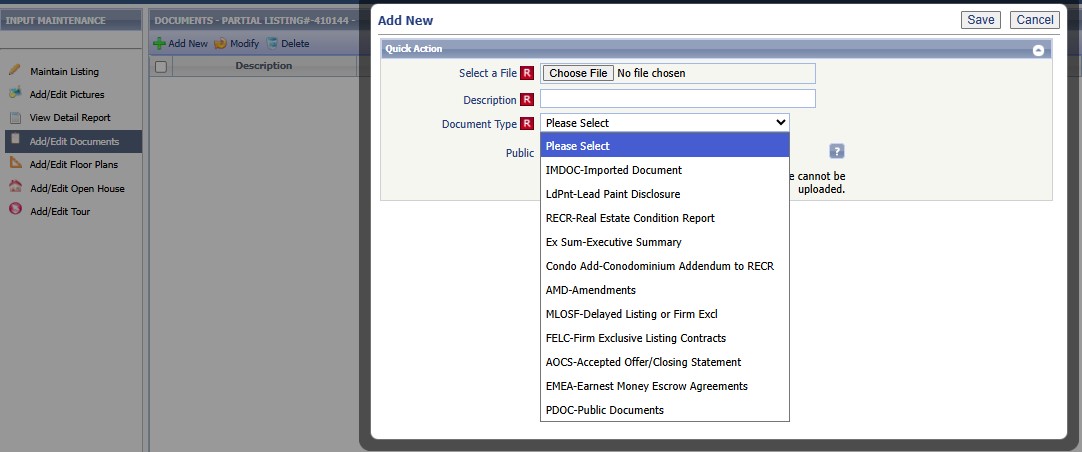
IMDOC (Imported Documents) — Private by default
Use for: Multiple Listing Options for Sellers (for Delayed Listings)
LdPNT (Lead-Based Paint Disclosure) — Public by default
Example: Addendum S
RECR (Real Estate Condition Report) — Public by default
Example: Real Estate Condition Report
Ex Sum (Executive Summary) — Public by default
Example: Condominium Executive Summary
Condo Add (Condo Addendum to the Real Estate Condition Report) — Public by default
Example: Condominium Addendum to the RECR
AMD (Amendment) — Private by default
Use when extending a delayed listing period or providing closing documentation
Examples:
WB-40 Amendment to the Offer to Purchase
WB-42 Amendment to the Listing Contract
MLOFS (Delayed Listing or Firm Exclusive) — Private by default
Use for: Multiple Listing Options for Sellers (for Delayed Listings)
AOCS (Accepted Offer/Closing Statement) — Private by default
Use to request MLS updates to listing or selling agent information on a sold property
EMEA (Earnest Money Escrow Agreement) — Public by default
Example: Earnest Money Escrow Agreements
PDOC (Public Document) — Public by default
Example: Features and Updates
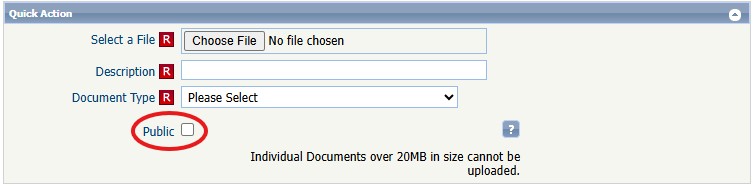
Here is a visual of the new input screen in paragon!
IMPORTANT – DO NOT CLICK THE PUBLIC BOX OR YOU WILL OVERRIDE THE LISTING DOCUMENT VISIBILITY TYPE.
FAQs
1. Who can see private documents?
The Listing Agent and Broker
MLS Staff
2. Who can see public documents?
All Agents
Buyers who have been emailed the listing, including within their Collaboration Center
3. Is this mandatory to upload? I want to email it as I always have
Uploading is the preferred process moving forward and helps staff process items more effectively
4. What if I accidentally make something private that should be public?
Simply go back and check the box making it public
5. What if I accidentally make something public that should be private?
Simply go back and uncheck the public box
6. Why do we have so many document types?
To ensure that the diverse needs of all listing types are covered
Nov
17
2025
Reminder - Pay Annual 2026 RASCW Membership Renewal Dues by Dec 1st
Members must pay their 2026 membership renewal dues by December 1, 2025. Renewal invoices are emailed to all members on October 1, 2025. If applicable, this also includes the renewal of your WRA and NAR memberships.
Renewal Timeline:Dues paid after December 31 will incur a late fee. Membership and associated services/benefits will be suspended for anyone who has not paid their renewal dues by December 31. Brokers will be billed for any unpaid agents in their office on January 2nd, and the MLS access of unpaid member offices will be suspended on January 30.
Dues are nonrefundable
Three Ways to Pay:
Click on the link in your emailed invoice and submit a credit card or EFT (online check) payment. If someone else is paying your invoice, simply forward the email to them – they can click and pay for you.
Log into yourHomeBase account, go to My Billing Info and click Make a Payment. Please Note: if you did not set up AutoPay prior to the date your invoice was created, it will not process your renewal payment – you will need to make a one-time payment and the AutoPay will pick up next time.
Mail your payment – please keep in mind that the due date to RECEIVE PAYMENT is December 1.
We are excited to announce our partnership with domii®, giving you FREE access to cutting-edge safety & prospecting tools! This is not just an app; it’s your competitive edge!
The Domii App acts as your mobile office, delivering instant access to property and owner information with just an address. Can instantly check:
Identity verification
Names, phone numbers, email addresses
Occupation & estimated income
Sex offender registry
Do not call registry information [Local and National]
If you’re experiencing problems in Paragon such as blank screens, pop ups not popping up, autofills not autofilling, you may need to clear your web browser’s cache. Cache is a collection of files on your PC in the background that allow Paragon to function. Sometimes those files get corrupted or deleted and they need to be refreshed.
Click here for a video with instructions for all the supported browsers, or click here for a PDF of instructions.
Nov
10
2025
Photos Not Showing in WIREX
We are tracking an issue in WIREX that has caused photos to be missing from new listings. This is affecting multiple MLS’ listings. We have an escalated ticket open with WIREX to fix this, and will post updates as we receive them.
We are also tracking an issue with Forewarn that is causing an issue with logging into the Forewarn app. We will post an update on this issue as we receive more information.
Nov
6
2025
Paragon issue - Saving searches on contacts
UPDATE 11:52am – this has been resolved. If you have any problems saving searches to contacts please contact us! 608-240-2800 press 2 or support@wisre.com
We are currently experiencing a problem with saving searches for notification. If you try to save a search onto a contact you will get an error and the search won’t be saved. We are working to fix this and updates will be posted here.